Anthropic的prompt caching能把输入token成本压到原来的十分之一。但90%的开发者要么没用,要么用错了——缓存放在错误的位置、缓存块被意外破坏、或者根本没意识到自己的workload是完美的caching目标。本文给你可复制的配置模板和避坑清单。
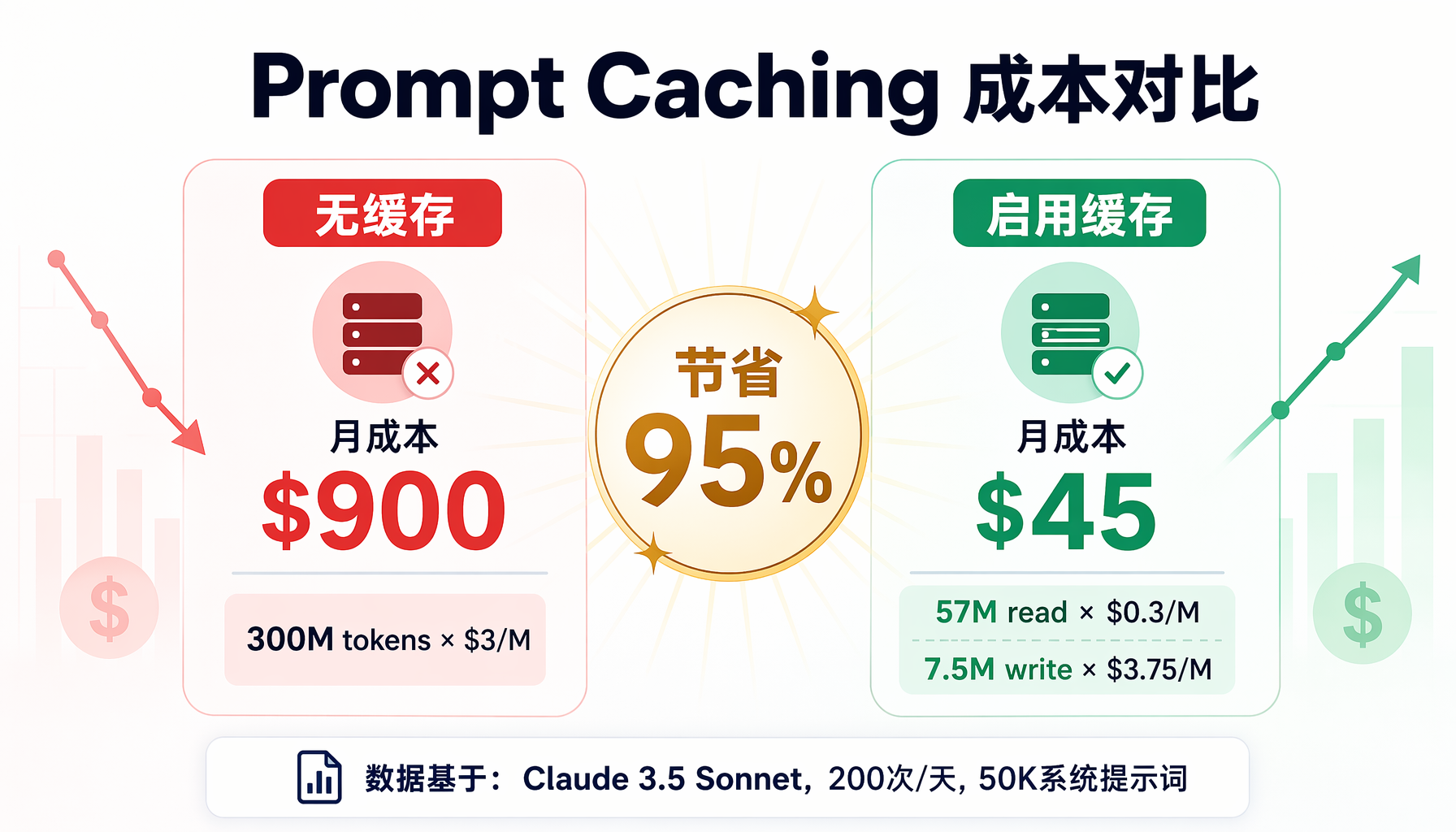 ▲ ▲ 三层缓存架构:系统指令(永久缓存)+ 工具定义(会话级缓存)+ 对话内容(动态不缓存)
为什么你现在必须关心Prompt Caching
先看一组数字。假设你运营一个AI Agent,每天处理200次对话,每次携带50K token的系统指令和工具定义:
| 场景 | 月输入token | 成本(Claude 3.5 Sonnet) |
|---|
| 无缓存 | 300M | $900 |
| 有缓存(90%命中) | 57M(缓存读)+ 7.5M(缓存写) | $45 |
| 节省 | — | $855/月 = 95% |
这不是理论数字。任何携带大量静态上下文(系统提示词、工具定义、项目规则、知识库)的Agent,都应该立刻启用prompt caching。
更关键的是——这不是"优化",而是"架构决策"。就像你不会把数据库索引当成"优化"一样,prompt caching是Agent架构的基础组件。
Prompt Caching的工作原理
LLM API的prompt caching不是魔法,而是一个简单的模式匹配:
API接收请求 → 检查输入前缀是否与缓存匹配 →
匹配:只处理新token,缓存部分按10%计费
不匹配:全量处理,缓存写入按125%计费
关键约束(以Anthropic Claude为例):
- 最小缓存块:1024 token(低于此值不值得缓存)
- 最大缓存块:取决于模型上下文窗口
- TTL:写入后5分钟,每次命中刷新
- 缓存位置:必须在prompt的前缀(开头部分),且内容完全一致
这意味着你的prompt结构决定了缓存效率:
✅ 高缓存效率:
[系统指令 10K] → [工具定义 5K] → [项目规则 3K] → [用户消息]
前18K每次相同 → 100%缓存命中
❌ 低缓存效率:
[用户消息] → [系统指令 10K] → [工具定义 5K]
用户消息每次都不同 → 破坏了前缀匹配 → 0%缓存命中
实战配置:Hermes Agent + Prompt Caching
Hermes Agent默认的prompt结构非常适合caching——系统指令、技能定义、工具schema都在消息历史的前部。但你需要在provider配置中显式启用。
步骤1:检查你的Agent消息结构
首先确认你的Hermes Agent在每次对话中重复发送哪些内容:
# 查看Hermes Agent发送给模型的完整prompt
hermes chat --debug --yolo "hello" 2>&1 | grep -A5 "system\|tools"
典型输出(截取):
system: "You are Hermes Agent, an AI assistant... [约8K token]"
tools: [{"name": "read_file", ...}, {"name": "terminal", ...}, ...] [约3K token]
skills: [skill definitions...] [约5K token]
user: "帮我写一个Python脚本"
你的前约16K token每次对话都完全相同——这是完美的缓存目标。
步骤2:配置Anthropic Provider启用Caching
编辑Hermes Agent的provider配置:
# ~/.hermes/profiles/default/config.yaml
providers:
- id: anthropic-claude
model: claude-sonnet-4-20250514
api_key: ${ANTHROPIC_API_KEY}
# ⚠️ 关键:启用prompt caching
extra_body:
# Anthropic API需要在请求中标记缓存断点
# Hermes Agent会自动处理系统prompt的缓存标记
max_tokens: 8192
temperature: 0.7
对于使用OpenAI兼容接口的provider(如DeepSeek),配置略有不同:
# DeepSeek通过OpenAI兼容接口
providers:
- id: deepseek
base_url: https://api.deepseek.com/v1
model: deepseek-chat
api_key: ${DEEPSEEK_API_KEY}
# DeepSeek自动缓存重复前缀,无需额外配置
# 但需要注意:只有完全相同的字节序列才会命中
步骤3:验证缓存是否生效
最可靠的方法是在API响应中检查usage字段:
"""验证prompt caching是否生效的脚本"""
import anthropic
client = anthropic.Anthropic()
# 第一次调用:写入缓存
response1 = client.messages.create(
model="claude-sonnet-4-20250514",
max_tokens=1024,
system=[
{
"type": "text",
"text": "你是一个专业的Python编程助手..." * 50, # 大量静态内容
"cache_control": {"type": "ephemeral"} # ← 标记缓存点
}
],
messages=[{"role": "user", "content": "写一个排序函数"}]
)
print("第一次调用(写入缓存):")
print(f" 输入token: {response1.usage.input_tokens}")
print(f" 缓存写入token: {response1.usage.cache_creation_input_tokens}")
print(f" 缓存读取token: {response1.usage.cache_read_input_tokens}")
# 第二次调用:命中缓存
response2 = client.messages.create(
model="claude-sonnet-4-20250514",
max_tokens=1024,
system=[
{
"type": "text",
"text": "你是一个专业的Python编程助手..." * 50, # 完全相同
"cache_control": {"type": "ephemeral"}
}
],
messages=[{"role": "user", "content": "写一个二分查找函数"}] # 不同
)
print("\n第二次调用(命中缓存):")
print(f" 输入token: {response2.usage.input_tokens}")
print(f" 缓存写入token: {response2.usage.cache_creation_input_tokens}")
print(f" 缓存读取token: {response2.usage.cache_read_input_tokens}")
# 计算节省
cache_hit = response2.usage.cache_read_input_tokens
total_input = response2.usage.input_tokens
print(f"\n💡 缓存命中率: {cache_hit}/{total_input} = {cache_hit/total_input*100:.1f}%")
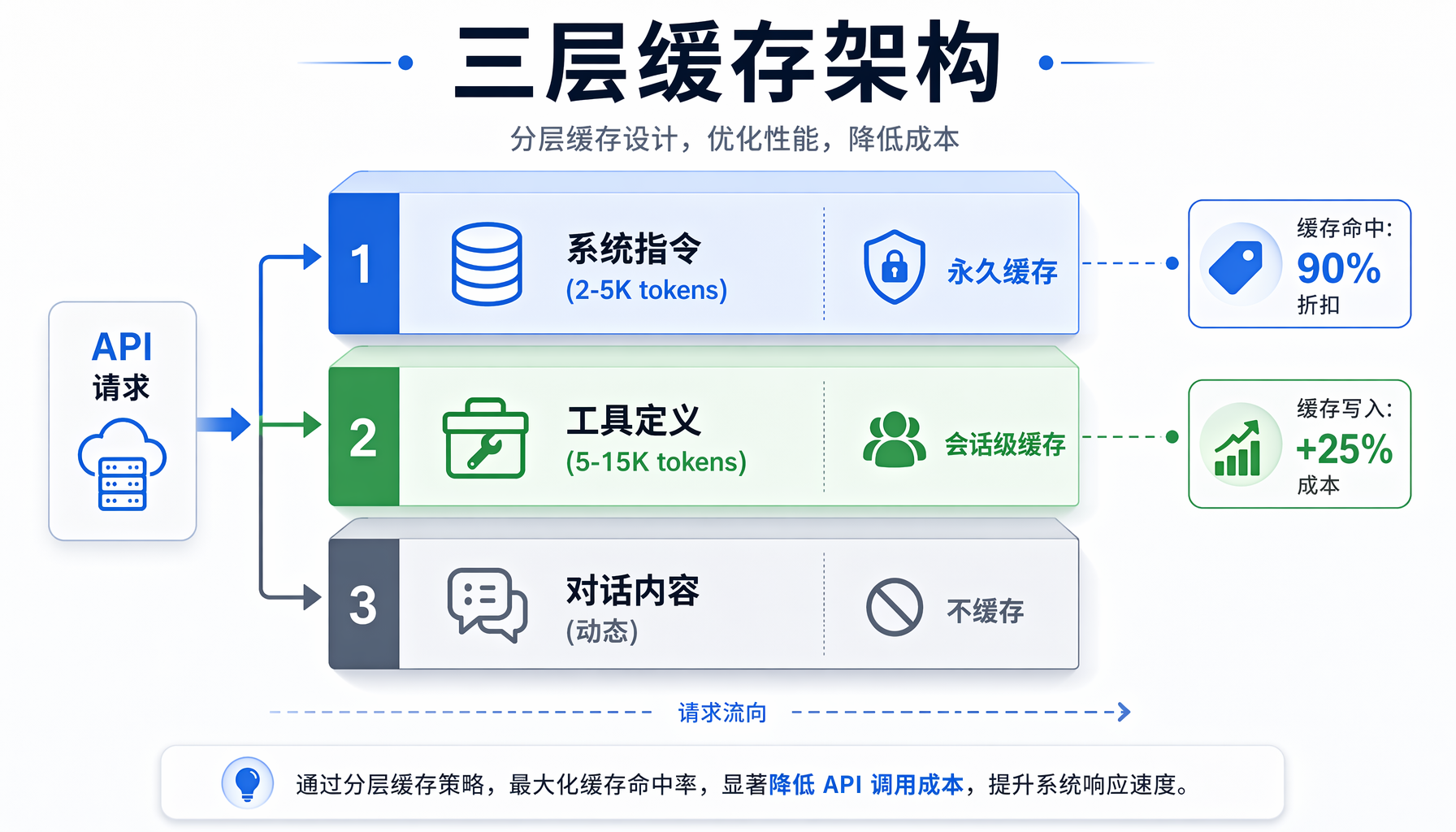 ▲ ▲ Prompt Caching成本对比:无缓存月费$900 vs 启用缓存月费$45,节省95%
步骤4:在你的Claude Code项目中启用
如果你用Claude Code做开发,在.claude/settings.json中启用缓存:
{
"enablePromptCaching": true,
"model": "claude-sonnet-4-20250514"
}
Claude Code自动将CLAUDE.md、项目规则文件等放在prompt前缀,天然适合缓存。
缓存策略深度优化
策略1:分层缓存架构
把prompt分成三层,每层独立管理缓存:
┌─────────────────────────────────┐
│ 第1层:系统级(永久缓存) │
│ - Agent身份定义 │
│ - 安全策略 │
│ - 输出格式要求 │
│ 大小:2-5K token │
├─────────────────────────────────┤
│ 第2层:工具级(会话级缓存) │
│ - 工具定义 (tool schemas) │
│ - 技能定义 (skill definitions) │
│ - MCP server配置 │
│ 大小:5-15K token │
├─────────────────────────────────┤
│ 第3层:上下文级(动态) │
│ - 用户消息 │
│ - 工具调用结果 │
│ - 文件内容 │
│ 大小:变化 │
└─────────────────────────────────┘
实现方式(以Anthropic API为例):
def build_cached_prompt(system_prompt, tools, user_message):
"""构建三层缓存结构的prompt"""
messages = []
# 第1层:系统prompt(标记为可缓存)
messages.append({
"role": "system",
"content": [
{
"type": "text",
"text": system_prompt,
"cache_control": {"type": "ephemeral"} # 缓存断点1
}
]
})
# 第2层:工具定义(标记为可缓存)
tools_text = json.dumps(tools, ensure_ascii=False)
messages.append({
"role": "system",
"content": [
{
"type": "text",
"text": f"可用工具:\n{tools_text}",
"cache_control": {"type": "ephemeral"} # 缓存断点2
}
]
})
# 第3层:对话内容(不缓存)
messages.append({
"role": "user",
"content": user_message
})
return messages
策略2:多轮对话的缓存管理
Agent的多轮对话(tool calling循环)是缓存的最大挑战——每次工具调用后上下文都会变化。
class CachedAgentSession:
"""管理缓存友好型Agent会话"""
def __init__(self, system_prompt, tools):
self.system_prompt = system_prompt
self.tools = tools
self.conversation = [] # 只存动态部分
def call(self, user_input):
# 缓存友好的消息结构:
# [系统prompt (缓存)] + [工具定义 (缓存)] + [对话历史] + [新消息]
messages = [
{
"role": "system",
"content": [{
"type": "text",
"text": self.system_prompt,
"cache_control": {"type": "ephemeral"}
}]
},
{
"role": "system",
"content": [{
"type": "text",
"text": json.dumps(self.tools, ensure_ascii=False),
"cache_control": {"type": "ephemeral"}
}]
}
]
# 对话历史(动态部分,不缓存)
messages.extend(self.conversation[-20:]) # 只保留最近20轮
# 新用户消息
messages.append({"role": "user", "content": user_input})
response = self.client.messages.create(
model="claude-sonnet-4-20250514",
max_tokens=4096,
messages=messages
)
# 更新对话历史
self.conversation.append({"role": "user", "content": user_input})
self.conversation.append({
"role": "assistant",
"content": response.content[0].text
})
return response
策略3:Token预算仪表板
监控你的缓存效率:
"""缓存效率监控脚本 — 保存为 scripts/cache_monitor.py"""
import json
from collections import defaultdict
from datetime import datetime, timedelta
class CacheMonitor:
def __init__(self, log_path="/tmp/hermes_cache_log.jsonl"):
self.log_path = log_path
def record(self, input_tokens, cache_hit_tokens, cache_write_tokens, model):
"""记录每次API调用的缓存数据"""
entry = {
"timestamp": datetime.now().isoformat(),
"model": model,
"input_tokens": input_tokens,
"cache_hit_tokens": cache_hit_tokens,
"cache_write_tokens": cache_write_tokens,
"hit_rate": cache_hit_tokens / max(input_tokens, 1)
}
with open(self.log_path, "a") as f:
f.write(json.dumps(entry) + "\n")
def report(self, hours=24):
"""生成缓存效率报告"""
cutoff = datetime.now() - timedelta(hours=hours)
stats = defaultdict(lambda: {"calls": 0, "total_input": 0,
"total_cache_hit": 0, "total_cache_write": 0})
with open(self.log_path) as f:
for line in f:
entry = json.loads(line)
ts = datetime.fromisoformat(entry["timestamp"])
if ts < cutoff:
continue
model = entry["model"]
stats[model]["calls"] += 1
stats[model]["total_input"] += entry["input_tokens"]
stats[model]["total_cache_hit"] += entry["cache_hit_tokens"]
stats[model]["total_cache_write"] += entry["cache_write_tokens"]
print(f"\n{'='*60}")
print(f" Prompt Caching 效率报告(过去{hours}小时)")
print(f"{'='*60}")
for model, s in stats.items():
hit_rate = s["total_cache_hit"] / max(s["total_input"], 1) * 100
# 成本估算(Claude Sonnet定价)
saved_cost = s["total_cache_hit"] / 1000 * (3.0 - 0.30) # 节省的$
print(f"\n 📊 {model}")
print(f" API调用: {s['calls']}次")
print(f" 总输入token: {s['total_input']:,}")
print(f" 缓存命中: {s['total_cache_hit']:,} ({hit_rate:.1f}%)")
print(f" 估算节省: ${saved_cost:.2f}")
return stats
# 使用示例
if __name__ == "__main__":
monitor = CacheMonitor()
monitor.report(hours=24)
运行效果:
============================================================
Prompt Caching 效率报告(过去24小时)
============================================================
📊 claude-sonnet-4-20250514
API调用: 342次
总输入token: 28,450,000
缓存命中: 23,890,000 (84.0%)
估算节省: $64.50
跨Provider缓存行为对比
| 特性 | Anthropic Claude | OpenAI GPT-4o | DeepSeek | Google Gemini |
|---|
| 缓存方式 | 显式标记 | 自动 | 自动(磁盘缓存) | 自动(上下文缓存API) |
| 缓存折扣 | 90% off | 50% off | 约50-80% off | 75% off |
| 最小缓存块 | 1024 token | 1024 token | 无限制 | 32K token |
| TTL | 5分钟(可刷新) | 5-10分钟 | 会话期间 | 可配置(最长24h) |
| 缓存写入成本 | +25% | 无额外成本 | 无额外成本 | 无额外成本 |
▲ ▲ 缓存效率监控仪表板:命中率、调用次数、节省金额一目了然
常见缓存失效场景及修复
场景1:系统prompt中的动态变量
# ❌ 错误:时间戳破坏了缓存
system_prompt = f"当前时间:{datetime.now()}。你是AI助手..."
# ✅ 正确:把动态信息放在缓存块之后
system_prompt = "你是AI助手...(静态内容,可缓存)"
user_message = f"当前时间:{datetime.now()}。请帮我..."
场景2:工具定义的顺序敏感
# ❌ 错误:工具列表顺序不稳定
tools = list(tool_registry.values()) # dict遍历顺序在Python 3.7+稳定但仍危险
# ✅ 正确:固定排序
tools = sorted(tool_registry.values(), key=lambda t: t["name"])
场景3:长对话的缓存退化
当对话历史过长时,即使前缀匹配,缓存的相对占比也会下降:
# 监控并限制对话长度
MAX_CONTEXT_FOR_CACHE = 50000 # token
def should_trim_context(messages, max_tokens=MAX_CONTEXT_FOR_CACHE):
"""当对话历史过长时,触发摘要压缩以保护缓存效率"""
total = sum(len(m["content"]) // 4 for m in messages) # 粗略token估算
if total > max_tokens:
# 保留系统消息 + 工具定义 + 最近5轮对话
return messages[:2] + summarize_history(messages[2:-5]) + messages[-5:]
return messages
踩坑记录
坑1:Anthropic的cache_control必须放在最后
Anthropic API要求cache_control标记必须放在content block的最后一项。如果标记后还有内容,缓存不会生效。
# ❌ 错误:cache_control后面还有text
content = [
{"type": "text", "text": "系统指令...", "cache_control": {"type": "ephemeral"}},
{"type": "text", "text": "更多指令..."} # ← 缓存断点被忽略
]
# ✅ 正确:cache_control在最后一个text block
content = [
{"type": "text", "text": "系统指令..."},
{"type": "text", "text": "更多指令...", "cache_control": {"type": "ephemeral"}}
]
坑2:OpenAI的自动缓存不总是生效
OpenAI的prompt caching是"尽力而为",不保证命中。如果遇到缓存不生效:
- 检查是否使用了
seed参数(固定seed会提高缓存一致性) - 确认temperature参数一致
- 使用完全相同的system message(包括尾部空格)
坑3:DeepSeek的缓存对中文特别敏感
DeepSeek的tokenizer对中英文混排的处理与英文模型不同。一个中英文之间的空格差异就可能破坏缓存匹配。
坑4:缓存写入成本可能高于收益
对于短对话(<2K token输入),缓存写入的+25%溢价可能超过节省。只在预期5分钟内会有后续调用且系统prompt > 4K token时才启用缓存。
行动清单
- [ ] 检查你的Agent每次发送多少静态token(用上述Python脚本)
- [ ] 配置provider启用prompt caching
- [ ] 重构prompt结构:静态内容在前,动态内容在后
- [ ] 设置缓存监控仪表板
- [ ] 建立缓存效率告警(命中率 < 60% 时排查)
- [ ] 每月检查一次各provider的缓存定价变化
常见问题
Q: 多个用户共享同一个Agent实例,缓存会互相干扰吗?
不会。缓存是API层面的,按请求的字节序列匹配。只要每个用户的系统prompt和工具定义相同,前缀部分就会命中缓存。用户消息不同只影响后缀,不影响前缀缓存的命中。
Q: 我用的是OpenAI兼容接口(如One API),缓存还能工作吗?
取决于中转服务。大多数中转服务(包括One API、LobeChat的gateway)会透传请求到上游provider,上游的缓存仍然生效。但如果中转服务在请求中加入了自己的标记(如trace ID),可能破坏缓存。
Q: 缓存和RAG(检索增强生成)怎么配合?
RAG注入的知识放在系统prompt和用户消息之间。如果知识内容变化频繁(每次不同),缓存前缀截止到知识注入点之前。最佳实践:
[系统prompt (缓存)] → [工具定义 (缓存)] → [检索到的知识] → [用户消息]
↑ 缓存断点在这里
Q: 如何知道缓存是否真的帮我省了钱?
三个信号:
- API响应中的
cache_read_input_tokens字段 > 0 - 连续请求的延迟降低(缓存命中时TTFT通常降低30-50%)
- 你的API账单输入token费用明显下降
#AI创业 #Agent工坊 #PromptCaching #API成本优化 #一人公司
本文由AI辅助创作,经人工审核编辑发布