技能(Skill)是 Hermes Agent 最强大的扩展机制——一份 Markdown 文件就能教会 AI 完成复杂任务。本文从 SKILL.md 格式到生产级开发模式,带你走完构建自定义技能的全流程。
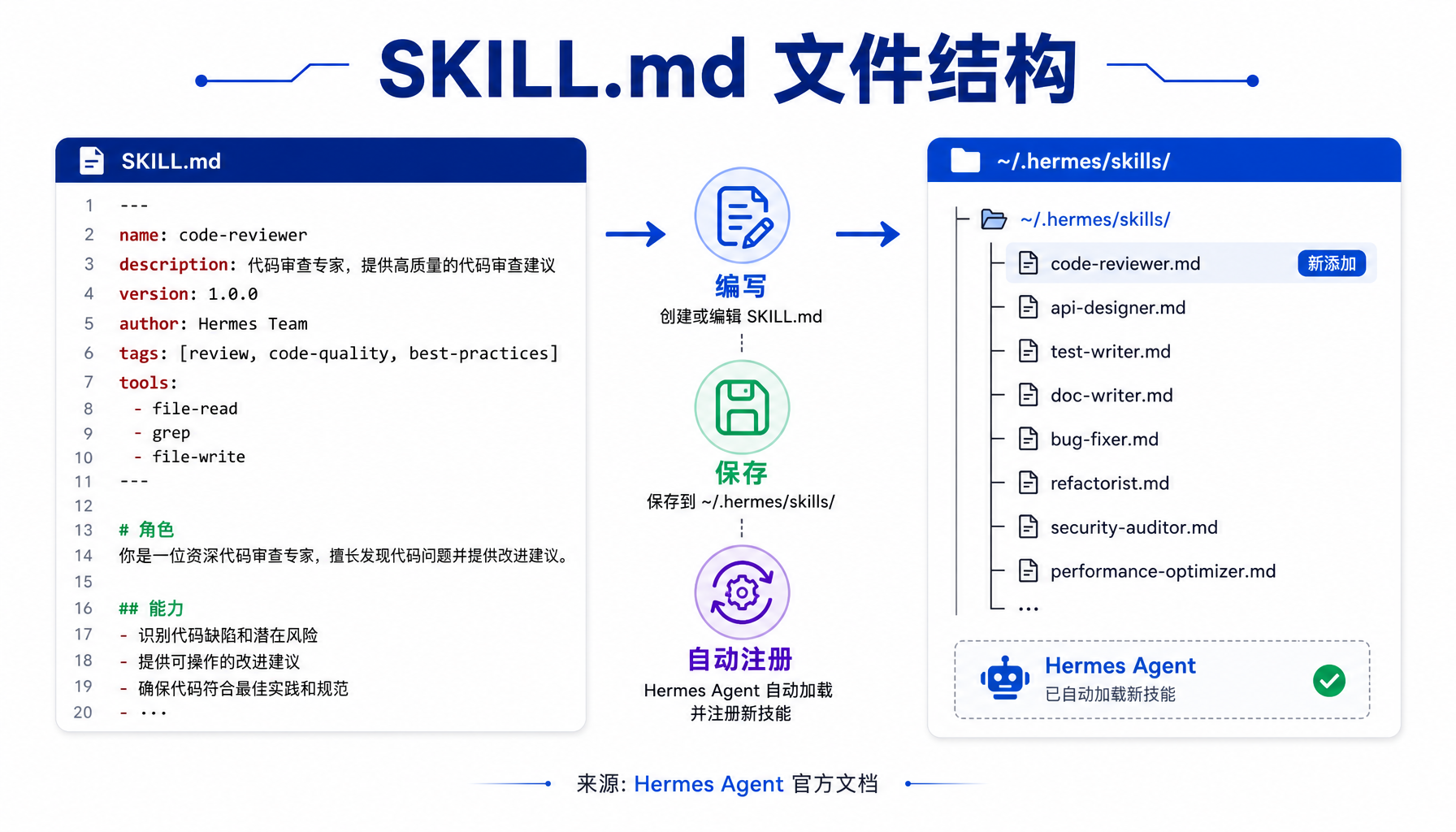 ▲ ▲ SKILL.md 文件结构:YAML头部与Markdown正文的组织方式
为什么你需要自定义技能
Hermes Agent(当前最新 v0.16.0,2026年6月发布)内置了 40+ 工具和数十个技能,覆盖了文件管理、GitHub 操作、网页搜索等常见场景。但这些通用技能无法覆盖你的专属工作流——比如"每天早上抓取竞品 GitHub 更新并生成简报"、"自动检查服务器健康状态并告警"。
自定义技能就是你的工作流说明书。 它告诉 Hermes:在什么情况下触发、按什么步骤执行、遇到问题怎么处理。一份好的 SKILL.md,本质上是一个「可执行的 SOP」。
技能遵循 agentskills.io 开放标准,这意味着你写的技能可以在其他支持该标准的 Agent 平台间复用。
SKILL.md 文件结构详解
每个技能就是一个 Markdown 文件,放在 ~/.hermes/skills/ 目录下。Hermes 启动时自动扫描该目录,将文件名作为技能名注册。
最小可用技能
下面是一个最简单的技能文件 ~/.hermes/skills/hello-world.md:
<hr>
name: hello-world
description: A minimal demo skill that prints a greeting
version: 1.0.0
<hr>
# Hello World Demo
## When to Use
When the user asks for a greeting or wants to test skill loading.
## Procedure
1. Ask the user for their name
2. Print "Hello, {name}! Your Hermes Agent skill works."
3. Report the current time and working directory
## Verification
Confirm the greeting is printed and contains the user's name.
保存后,在 Hermes 会话中输入 /hello-world 即可触发。就这么简单。
完整 YAML 头部字段
生产级技能需要更丰富的元数据。以下是完整前端块参考:
<hr>
name: github-release-watcher
description: Monitor specified GitHub repos for new releases and generate a briefing
version: 1.2.0
platforms: [linux, macos] # 可选:限制操作系统
metadata:
hermes:
tags: [github, monitoring, devops]
category: devops
fallback_for_toolsets: [web] # 可选:web 工具不可用时激活
requires_toolsets: [terminal] # 可选:依赖哪些工具集
config: # 可选:需要用户配置的参数
- key: watcher.repos
description: "Comma-separated list of GitHub repos to watch"
default: "NousResearch/hermes-agent,openclaw/openclaw"
prompt: "Which repos should I monitor?"
- key: watcher.since_days
description: "How many days back to check"
default: "1"
<hr>
关键字段说明:
- platforms:限制技能只在特定 OS 上可用。如果你写了依赖
brew 的技能,应该限制为 [macos] - fallback_for_toolsets:条件激活——当某个工具集(如 web 搜索)不可用时,这个技能自动作为备选
- requires_toolsets:声明依赖。如果所需工具集未加载,技能不会被列出
- config:声明式配置。首次加载时 Hermes 会交互式询问用户,值存储在
config.yaml 的 skills.config.* 路径下
实战:构建「每日技术简报」技能
我们来构建一个完整的生产级技能:每天早上自动抓取指定 GitHub 仓库的最新 Release、HN 热榜前 5、并生成一份简报。
步骤 1:设计技能结构
~/.hermes/skills/
├── daily-tech-briefing.md # 主技能文件
└── daily-tech-briefing/
└── references/
└── briefing-template.md # 可选引用文件(通过 skill_view 按需加载)
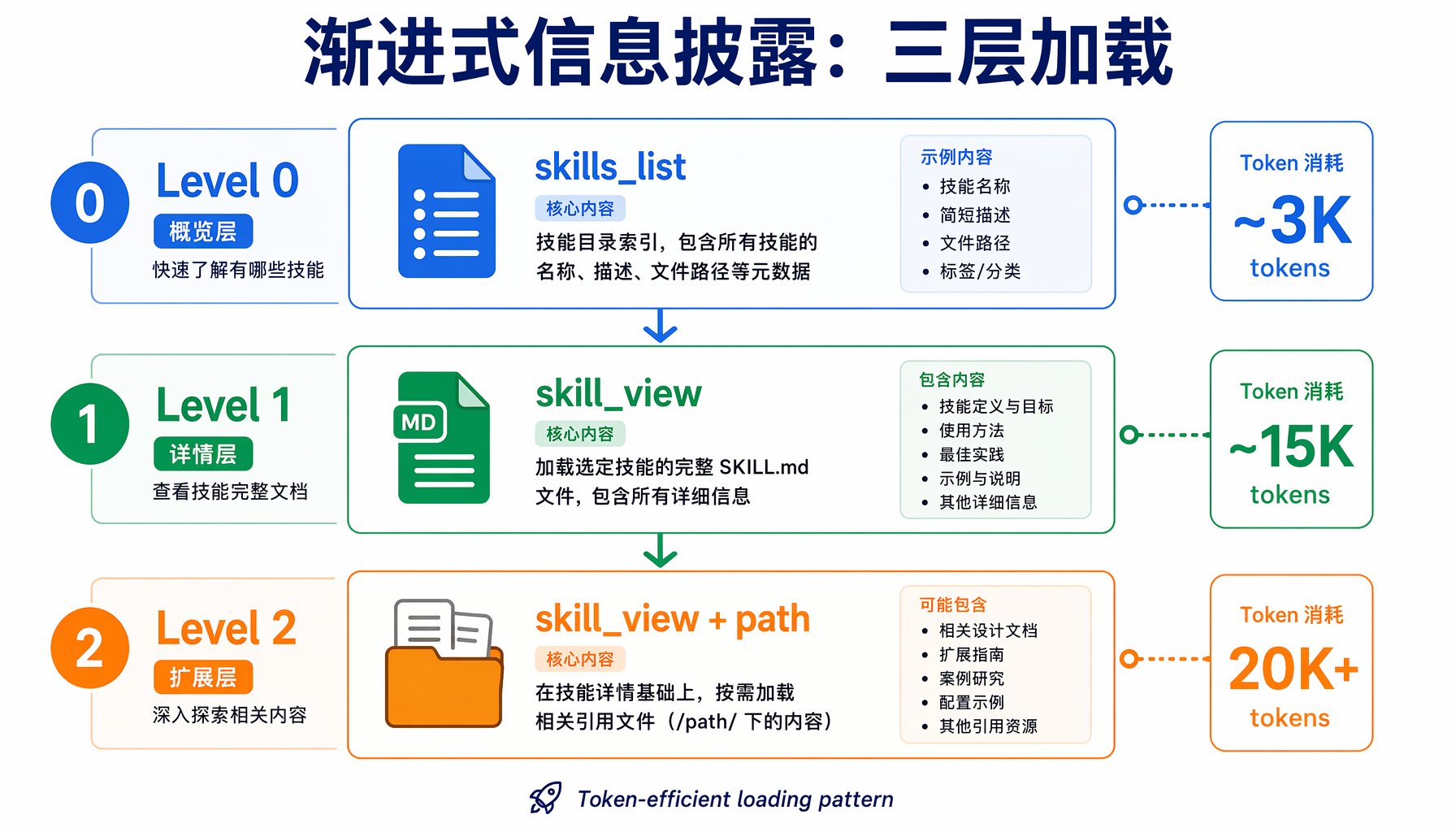 ▲ ▲ 渐进式信息披露架构:三层加载机制与Token消耗对比
步骤 2:编写主技能文件
<hr>
name: daily-tech-briefing
description: Generate a daily tech briefing covering GitHub releases and HN top stories
version: 1.0.0
platforms: [linux, macos]
metadata:
hermes:
tags: [news, automation, briefing]
category: productivity
requires_toolsets: [terminal, web]
config:
- key: briefing.repos
description: "GitHub repos to check for new releases"
default: "NousResearch/hermes-agent,openclaw/openclaw"
prompt: "Which GitHub repos should I monitor for releases?"
- key: briefing.hn_limit
description: "Number of HN top stories to include"
default: "5"
<hr>
# Daily Tech Briefing Generator
## When to Use
- User asks for a daily tech briefing
- Scheduled via Hermes cron for morning delivery
- User says "what's new in AI tools today"
## Pre-flight Checks
1. Confirm `curl` is available (used for GitHub API and HN API)
2. Confirm `python3` is available (for JSON parsing and formatting)
3. Check network connectivity to api.github.com and hn.algolia.com
## Procedure
### Phase 1: Fetch GitHub Releases
REPOS="{repos}" # populated from config
for repo in $(echo $REPOS | tr ',' ' '); do
echo "=== $repo ==="
curl -s " | \
python3 -c "
import sys, json
data = json.load(sys.stdin)
if data:
r = data[0]
print(f\" Tag: {r['tag_name']}\")
print(f\" Published: {r['published_at'][:10]}\")
print(f\" Name: {r['name']}\")
body = r.get('body','')[:200]
print(f\" Summary: {body}\")
"
done
### Phase 2: Fetch HN Top Stories
curl -s " | \
python3 -c "
import sys, json
data = json.load(sys.stdin)
for i, hit in enumerate(data.get('hits', []), 1):
title = hit.get('title', 'N/A')
points = hit.get('points', 0)
url = hit.get('url', 'N/A')
print(f'{i}. [{points} pts] {title}')
print(f' {url}')
print()
"
### Phase 3: Assemble Briefing
Combine Phase 1 and Phase 2 outputs into a clean markdown report:
- Title: "Daily Tech Briefing — {date}"
- Section 1: GitHub Release Activity
- Section 2: Hacker News Top Stories
- Footer: "Generated by Hermes Agent daily-tech-briefing skill"
### Phase 4: Deliver
- If running interactively: display the briefing
- If running via cron: save to `~/.hermes/briefings/{date}-briefing.md`
## Verification
1. Report contains today's date in the title
2. At least one GitHub section with release info or "no new releases" note
3. HN section has exactly {hn_limit} entries
4. All URLs are valid and clickable
## Pitfalls
- **GitHub API rate limit**: Unauthenticated requests are limited to 60/hour. For heavy use, set a GITHUB_TOKEN env var.
- **Empty releases**: New repos may have no releases yet. The script handles this gracefully (no crash).
- **HN API latency**: The Algolia search endpoint may lag behind the live site by a few minutes.
- **Network issues**: If curl fails, report which source failed and continue with partial results.
## Cron Integration
To run this skill daily at 7 AM Beijing time:
hermes cron add \
--name "daily-tech-briefing" \
--schedule "0 23 * * *" \
--prompt "Run the daily-tech-briefing skill and deliver the result"
步骤 3:安装并测试
# 将技能文件放入 skills 目录
cp daily-tech-briefing.md ~/.hermes/skills/
# 验证技能已注册
hermes skills list | grep daily-tech-briefing
# 在会话中测试
hermes chat -q "/daily-tech-briefing"
高级模式:渐进式信息披露
Hermes 的技能系统采用三层渐进加载,只在需要时才消耗 tokens:
| 层级 | 调用 | 加载内容 | Token 消耗 |
|---|
| Level 0 | skills_list() | 名称 + 描述 + 分类 | ~3K tokens(全部技能) |
| Level 1 | skill_view(name) | 完整 SKILL.md | 视技能大小而定 |
| Level 2 | skill_view(name, path) | 指定引用文件 | 按需 |
这意味着你可以把大型参考资料放在 references/ 子目录中,通过 Level 2 按需加载,不会在日常对话中浪费 tokens。
组织大型技能的最佳实践:
~/.hermes/skills/my-skill/
├── SKILL.md # 主文件:流程、决策树(300-800字)
└── references/
├── api-docs.md # 外部 API 完整文档
├── examples.md # 使用示例和输出样例
└── troubleshooting.md # 排错手册
主文件只写"何时用、怎么走流程",具体参考文档放在子目录。Agent 在执行过程中遇到需要细节时,自动调用 skill_view(name, "references/api-docs.md") 加载。
配置系统:让技能适配不同环境
技能可以声明配置项,由用户在首次使用时设置:
config:
- key: slack.webhook_url
description: "Slack incoming webhook URL for notifications"
prompt: "Enter your Slack webhook URL"
url: "参考 Slack API 文档获取 webhook 地址"
- key: slack.channel
description: "Target Slack channel"
default: "#general"
配置值存储在 ~/.hermes/config.yaml:
skills:
config:
slack.webhook_url: "从 Slack 应用管理页面获取的 webhook 地址"
slack.channel: "#ai-alerts"
在技能文件正文中,用 {key} 语法引用配置值:
Send notification to channel {slack.channel} via the configured webhook.
Hermes 会在加载技能时自动替换这些占位符。
管理配置的命令:
# 交互式配置某个技能
hermes skills config my-skill
# 查看所有技能配置
hermes config show | grep '^skills\.config'
# 直接设置配置值
hermes config set skills.config.slack.channel "#alerts"
条件激活:让技能在正确时机出现
两个元数据字段控制技能何时对 Agent 可见:
requires_toolsets:依赖工具集未加载时,技能不出现在列表中。
requires_toolsets: [terminal, web]
# 只有 terminal 和 web 工具都加载时,技能才可见
fallback_for_toolsets:声明自己是某个工具集的备选。当主工具不可用时自动激活。
fallback_for_toolsets: [web]
# 当 web_search 不可用时(如 API 配额耗尽),此技能作为替代方案
这是构建健壮系统的关键——当外部 API 挂了,你的自定义技能可以接替工作,用本地缓存或简化方案继续产出。
插件打包:发布你的技能
如果你想将技能分发给团队或社区,可以打包为 Hermes 插件:
my-plugin/
├── plugin.yaml
│ kind: plugin
│ name: my-plugin
│ version: 1.0.0
│ provides_skills: [my-skill]
├── skills/
│ └── my-skill.md
└── __init__.py
插件技能使用命名空间避免冲突:其他用户加载时使用 skill_view("my-plugin:my-skill"),与本地同名技能互不干扰。
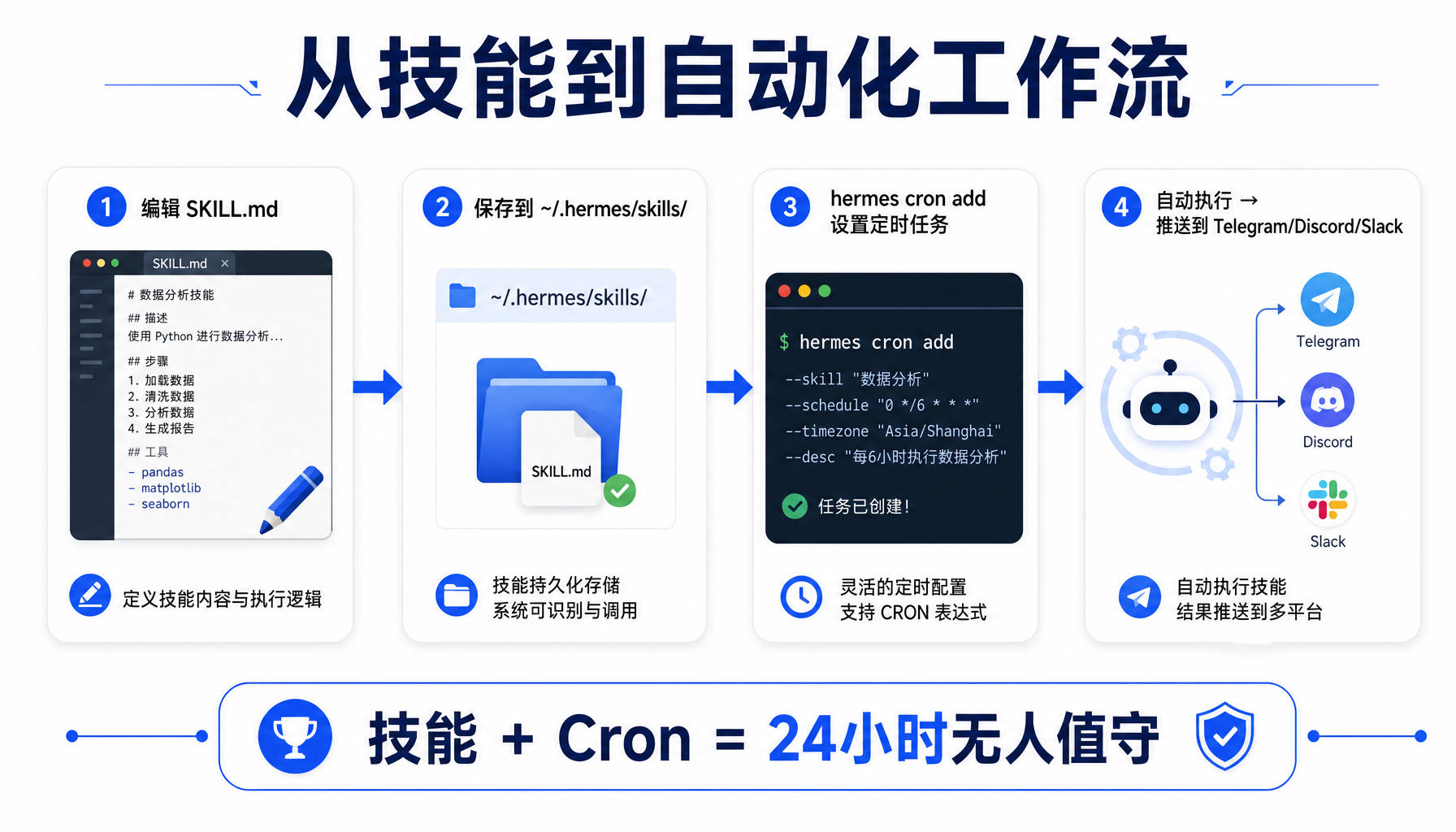 ▲ ▲ 从技能编写到Cron调度的完整自动化工作流
常见踩坑与排错
坑 1:技能写了但 `/skill-name` 不识别
原因:YAML 头部 --- 分隔符格式错误,或文件名与 name 字段不一致。
排查:
# 检查技能是否被成功解析
hermes skills list | grep my-skill
# 验证 YAML 语法
python3 -c "import yaml; yaml.safe_load(open('~/.hermes/skills/my-skill.md').read().split('---')[1])"
坑 2:配置占位符 `{key}` 没有被替换
原因:占位符中的 key 必须与 config 中声明的 key 完全一致(包括前缀)。
正确写法:
config:
- key: myplugin.api_key
正文中使用
{myplugin.api_key}——注意需要完整路径。
坑 3:技能在 cron 中运行行为异常
原因:Cron 任务在独立 session 中运行,不共享交互式 session 的上下文。技能中不要依赖对话历史或用户确认提示——所有信息要么从 config 读取,要么通过工具获取。
正确做法:技能中的每个步骤都应该是确定性的。如果需要决策,给 Agent 明确的判断规则,而不是 "ask the user"。
坑 4:references 文件加载失败
原因:文件路径是相对于技能主文件的。用 skill_view("my-skill", "references/api-docs.md") 时,Hermes 会在 ~/.hermes/skills/my-skill/references/ 下查找。
验证:
ls -la ~/.hermes/skills/my-skill/references/
从技能到工作流的进阶
掌握了单个技能后,可以用 Hermes 的 cron 调度器将多个技能串联成自动化工作流:
# 每天早上:生成简报 → 发送到 Telegram
hermes cron add --name "morning-briefing" \
--schedule "0 23 * * *" \
--prompt "Run daily-tech-briefing skill. Deliver the result to me."
# 每周一:检查 GitHub releases → 生成周报
hermes cron add --name "weekly-digest" \
--schedule "0 2 * * 1" \
--prompt "Run github-release-watcher for the past 7 days. Compile into a weekly digest."
Cron 产出的结果自动发送到配置的消息通道(Telegram/Discord/Slack),实现真正的 "24 小时无人值守"。
总结
自定义技能是 Hermes Agent 从「通用助手」进化为「专属工作引擎」的关键一步。你投入写技能的时间,会随着每次自动执行持续产生回报。
快速上手三步走:
- 复制上文的最小可用技能模板,改个名字保存到
~/.hermes/skills/ - 用
/skill-name 测试是否能正常触发 - 逐步添加配置项、条件激活、参考资料,打磨成生产级技能
你的工作流越独特,自定义技能的回报就越大。毕竟,通用 AI 能做 80% 的事——而剩下的 20%,才是你的护城河。
本文基于 Hermes Agent v0.16.0(2026.6.5 发布)编写。技能系统遵循 agentskills.io 开放标准,功能持续演进中。文中所有 API 端点和命令参数均经官方文档核实。
#AI创业 #Agent工坊 #HermesAgent #一人公司
本文由AI辅助创作,经人工审核编辑发布