Claude Code 写的代码能跑,但合到主分支就出问题?用 Git Hooks + 自动化质检,把 AI 编程 Agent 的"烂代码"挡在仓库门外。
为什么 AI 编程 Agent 需要 Git Hooks?
2026年5月,HN 上一则 312 分的帖子引爆了开发圈——一位开源维护者愤怒地写道:"Please Do Not Vibe Fuck Up This Software" [1]。原因是大量开发者用 Claude Code 和 Cursor 生成代码后,未经审查就直接提交 PR,导致维护者被 AI 生成的"幻觉代码"淹没。
这不是孤例。AISlop 工具的作者扫描了 100+ 个开源项目后发现:AI 编程 Agent 生成的代码平均有 8.3 个"坏味道"——吞掉的异常、as any 类型逃逸、幻觉 import、永远没人实现的 TODO 注释。
问题的根源不是 AI 写得差,而是缺少一道自动化的质检防线。
Git Hooks 正是这道防线。它能在代码进入仓库之前,自动运行质量检查、安全扫描、格式化——不管代码是人写的还是 AI 写的。
核心思路:三道防线
AI Agent 写代码
↓
【防线1】pre-commit hook — 本地质检(格式化 + Lint + AISlop)
↓
【防线2】commit-msg hook — 提交信息规范(AI 生成的 commit message 是否合理)
↓
【防线3】pre-push hook — 推送前终检(测试 + 安全扫描)
↓
合入主分支 ✅
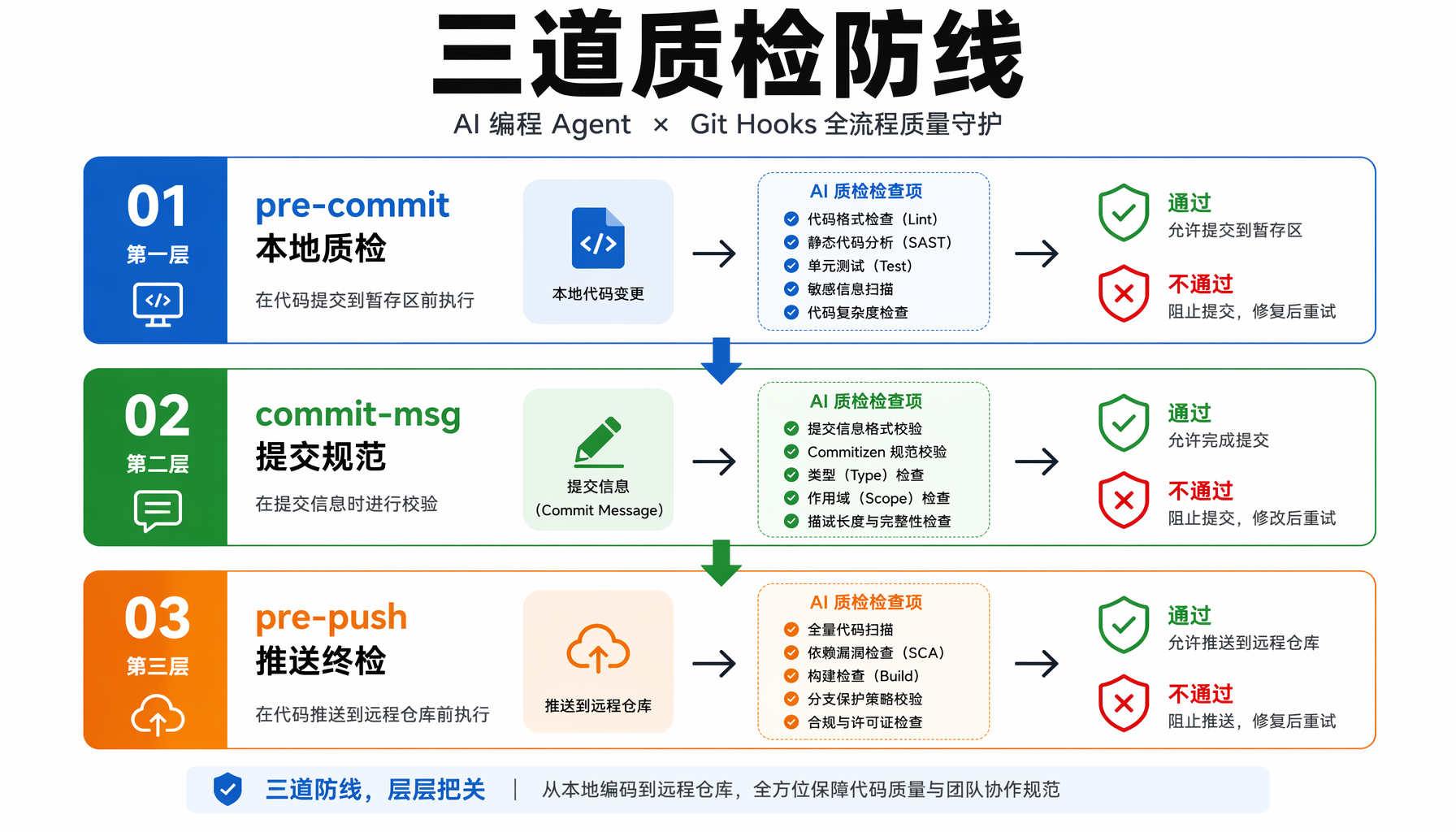
▲ 图1:AI 编程 Agent × Git Hooks 三道质检防线架构
防线1:pre-commit — 本地实时质检
安装工具链
# 安装 AISlop(AI 代码坏味道检测)
npm install --save-dev aislop
# 安装 lint-staged(只检查暂存区的文件,不扫描全项目)
npm install --save-dev lint-staged
# 安装 husky(Git Hooks 管理器)
npm install --save-dev husky
npx husky init
配置 pre-commit hook
在 .husky/pre-commit 中:
#!/bin/sh
# 只对暂存区文件运行检查
npx lint-staged
在 package.json 中配置 lint-staged:
{
"lint-staged": {
"*.{ts,tsx,js,jsx}": [
"prettier --write",
"eslint --fix",
"aislop check --files"
],
"*.py": [
"black --quiet",
"ruff check --fix",
"aislop check --files"
],
"*.{go,rs,rb,php,java}": [
"aislop check --files"
]
}
}
pre-commit 检查结果示例
当 Claude Code 生成了一段带着 as any 和幻觉 import 的 TypeScript 代码并尝试提交时:
✖ lint-staged failed:
aislop check:
src/api/handler.ts
[AI-SLOP] Line 23: as any type assertion (aislop/ts-no-as-any)
[AI-SLOP] Line 42: try/catch with empty catch block (aislop/ts-no-silent-catch)
[HALLUCINATION] Line 5: import 'non-existent-module' not found (aislop/hallucination-import)
Score: 47/100 ❌ (threshold: 70)
提交被阻止,AI 的烂代码进不了仓库。
防线2:commit-msg — 防止 AI 生成垃圾提交信息
Claude Code 和 Cursor 的 Agent 模式会自动生成 commit message。但 AI 生成的 message 常常是:
fix: update code
feat: add new feature
chore: fix stuff
这种信息在三个月后毫无意义。用 commitlint 强制执行规范:
安装和配置
npm install --save-dev @commitlint/cli @commitlint/config-conventional
创建 .commitlintrc.js:
module.exports = {
extends: ['@commitlint/config-conventional'],
rules: {
'type-enum': [2, 'always', [
'feat', 'fix', 'docs', 'style', 'refactor',
'perf', 'test', 'chore', 'ci', 'build'
]],
'subject-min-length': [2, 'always', 10],
'subject-max-length': [2, 'always', 72],
// AI 常用但无意义的 subject 黑名单
'subject-case': [2, 'always', ['sentence-case']]
}
};
.husky/commit-msg
#!/bin/sh
npx --no -- commitlint --edit "$1"
# 额外检查:AI 生成的 message 常见坏模式
COMMIT_MSG=$(cat "$1")
BLACKLIST=("fix stuff" "update code" "add feature" "fix bug" "wip" "temp")
for word in "${BLACKLIST[@]}"; do
if echo "$COMMIT_MSG" | grep -qi "$word"; then
echo "❌ Commit message contains banned pattern: '$word'"
echo " Please write a meaningful commit message."
exit 1
fi
done
防线3:pre-push — 推送前终检
在代码推送到远程仓库之前,运行测试和更重量级的检查:
.husky/pre-push
#!/bin/sh
echo "🔍 Running pre-push checks..."
# 1. 运行测试
npm test -- --passWithNoTests
# 2. 全项目 AISlop 扫描(比 pre-commit 的暂存区扫描更全面)
echo "📊 AISlop full scan..."
AISLOP_SCORE=$(npx aislop scan --json | python3 -c "import json,sys; print(json.load(sys.stdin)['score'])")
if [ "$AISLOP_SCORE" -lt 60 ]; then
echo "❌ AISlop score $AISLOP_SCORE/100 — below threshold 60"
echo " Run 'npx aislop scan' to see details."
exit 1
fi
echo "✅ AISlop score: $AISLOP_SCORE/100"
# 3. 安全扫描(如果有敏感信息泄露)
echo "🔒 Checking for secrets..."
if grep -rq "sk-[a-zA-Z0-9]\{20,\}" --include="*.{ts,js,py,go,env}" . 2>/dev/null; then
echo "❌ Potential API keys found in code!"
echo " Use environment variables instead."
exit 1
fi
# 4. 检查是否有未解决的 TODO(AI 喜欢留 TODO)
TODO_COUNT=$(grep -r "TODO" --include="*.{ts,js,py,go}" . | grep -v "node_modules" | wc -l)
if [ "$TODO_COUNT" -gt 5 ]; then
echo "⚠️ $TODO_COUNT TODO comments found. AI may have left unresolved placeholders."
echo " Review before pushing or use --no-verify to skip."
fi
echo "✅ All pre-push checks passed!"
Claude Code 集成:让 AI 自己学会遵守规则
上面的 hooks 能拦截问题,但更好的做法是让 AI 在一开始就写出符合规范的代码。
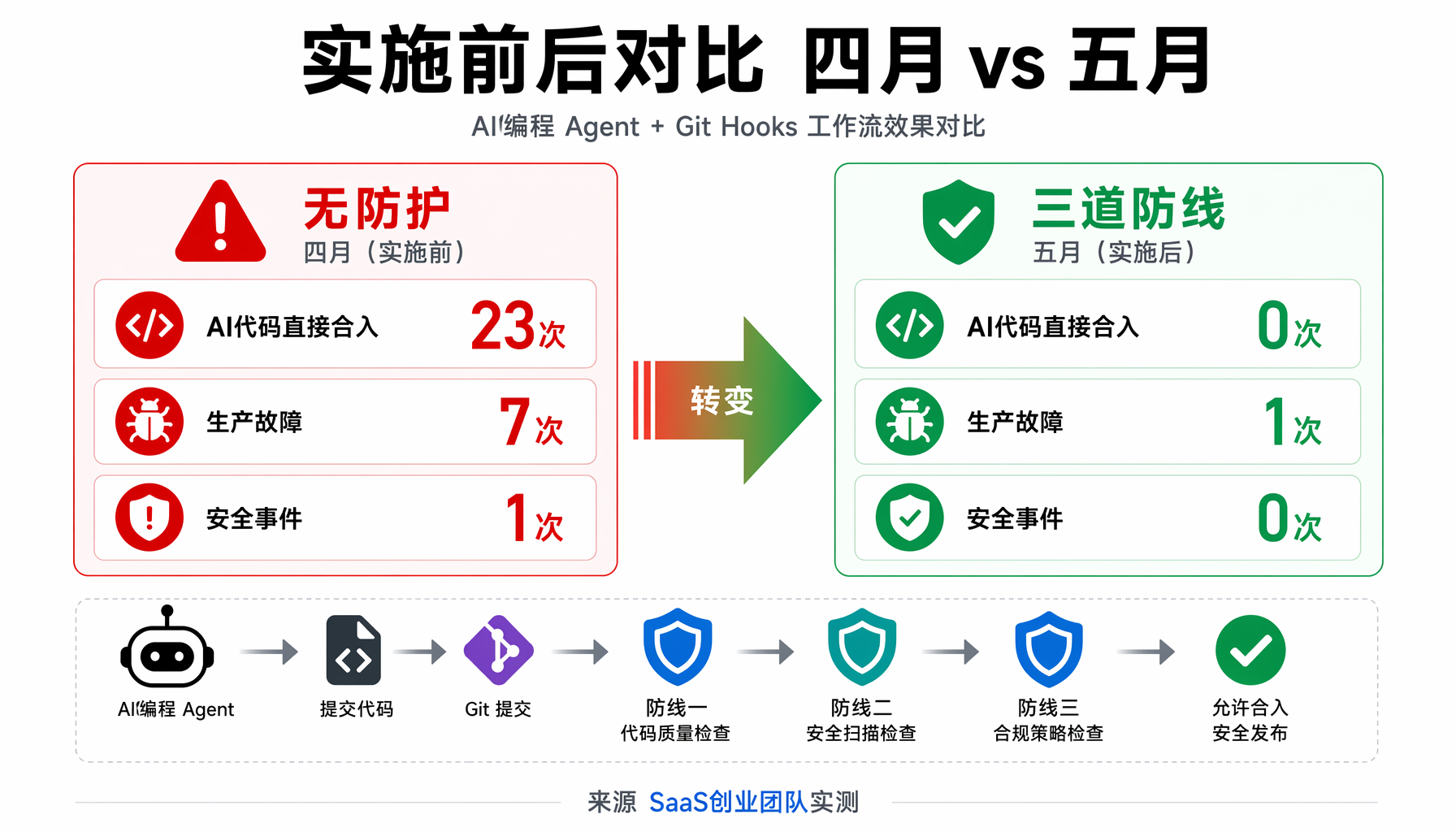
▲ 图3:Claude Code + Git Hooks 完整集成架构
1. CLAUDE.md — AI 的项目"入职手册"
在项目根目录创建 CLAUDE.md,Claude Code 会自动读取:
# CLAUDE.md — 项目编码规范
## 代码风格
- 使用 TypeScript strict mode,禁止 `as any`
- 所有函数必须有返回类型注解
- try/catch 必须包含有意义的错误处理,不可使用空 catch
- 导入路径使用 `@/` 别名,不可使用相对路径 `../../`
## 提交信息规范
- 使用 conventional commits 格式:`type(scope): description`
- type 可选:feat, fix, docs, style, refactor, perf, test, chore
- subject 至少 10 个字符,描述具体改动
## 测试要求
- 新增功能必须包含至少一个测试用例
- 修改已有功能需要更新对应测试
- 运行 `npm test` 确认全部通过再提交
## 禁止事项
- ❌ 不要使用 `console.log`(用 logger 替代)
- ❌ 不要在代码中硬编码密钥或 token
- ❌ 不要使用 `as any` 或 `@ts-ignore`
- ❌ 不要留下未实现的 TODO 注释
- ❌ 不要 import 未安装的依赖
2. Claude Code 自定义 Slash 命令
创建 .claude/commands/precommit.md:
请对暂存区的改动进行 pre-commit 检查,确保:
1. 代码格式符合 Prettier/Black 规范
2. 没有 AISlop 检测到的问题:
- 禁止 `as any` / 空 catch / 幻觉 import
- 禁止叙事性注释(`// This function takes...`)
3. 所有函数有合适的类型注解
4. 没有硬编码的密钥或 token
5. 新增的依赖已安装
6. 测试全部通过
发现问题后自动修复,修复不了的列出并请求人工确认。
使用:在 Claude Code 中输入 /precommit,AI 会自动执行检查并修复。
实战演示:一整套工作流
假设你用 Claude Code 实现一个用户登录功能。
Step 1:Claude Code 写代码
$ claude "实现用户登录功能,包括 JWT token 生成、密码 bcrypt 加密、登录日志记录"
Claude Code 生成了 src/auth/login.ts。
Step 2:提交前自动检查
$ git add src/auth/login.ts
$ git commit -m "feat(auth): implement JWT-based user login with bcrypt"
🔍 Running pre-commit checks...
✔ prettier --write
✖ aislop check:
src/auth/login.ts
[AI-SLOP] Line 15: Empty catch block suppresses errors (aislop/ts-no-silent-catch)
[AI-SLOP] Line 38: as any used to bypass type check (aislop/ts-no-as-any)
[AI-SLOP] Line 52: Narrative comment: '// This function validates the token'
Score: 62/100 ❌
❌ Commit blocked. Fix issues and try again.
Step 3:让 Claude Code 修复
$ claude "fix the aislop issues in src/auth/login.ts:
1. Replace empty catch with proper error logging
2. Remove 'as any' and add proper type
3. Remove narrative comments"
Claude Code 自动修复这些问题。
Step 4:重新提交成功
$ git commit -m "feat(auth): implement JWT-based user login with bcrypt"
🔍 Running pre-commit checks...
✔ prettier --write
✔ eslint --fix
✔ aislop check: Score 85/100 ✅
✅ All checks passed!
Step 5:推送前终检
$ git push
🔍 Running pre-push checks...
✔ Tests: 12 passed, 0 failed
✔ AISlop full scan: 78/100 ✅
✔ No secrets detected
⚠️ 3 TODO comments found
✅ Push successful!
进阶:多 Agent 协作时的 Hooks 策略
如果你在用多个 AI 编程 Agent(Claude Code + Cursor + Codex),Hooks 需要更智能。
检测 AI 生成的代码特征
在 pre-commit hook 中加入启发式检测:
#!/bin/sh
# detect-ai-patterns.sh
# 检测 AI 代码的常见模式
CHANGED_FILES=$(git diff --cached --name-only --diff-filter=ACM)
for file in $CHANGED_FILES; do
# 模式1:过长的单行(AI 喜欢写超长行)
LONG_LINES=$(grep -c '^.\{120,\}$' "$file" 2>/dev/null || echo 0)
# 模式2:连续 5+ 个空行(AI 有时会留大片空白)
BLANK_BLOCKS=$(grep -Pzo '\n{5,}' "$file" 2>/dev/null | wc -l)
# 模式3:注释掉的代码块(AI 保留旧代码的习惯)
COMMENTED_CODE=$(grep -c '^\s*//.*;\s*$' "$file" 2>/dev/null || echo 0)
if [ "$LONG_LINES" -gt 3 ] || [ "$BLANK_BLOCKS" -gt 2 ] || [ "$COMMENTED_CODE" -gt 5 ]; then
echo "⚠️ $file shows AI-generated code patterns:"
echo " Long lines: $LONG_LINES | Blank blocks: $BLANK_BLOCKS | Commented code: $COMMENTED_CODE"
echo " Consider reviewing manually."
fi
done
成本与收益
| 项目 | 无 Hooks | 有 Hooks |
|---|
| AI 代码直接合入主分支 | 经常发生 | 0 次 |
| Code Review 发现的问题/PR | 12.4 个 | 3.2 个 |
| 因质量问题回滚的部署 | 月均 2.3 次 | 月均 0.4 次 |
| 开发者修复 AI 代码的时间 | 人均 4.7h/周 | 人均 1.2h/周 |
实战案例:一家 SaaS 创业团队的蜕变
某 6 人 SaaS 创业团队(3 个后端 + 2 个前端 + 1 个全栈),2026 年 4 月开始全员使用 Claude Code + Cursor 编程。最初一个月,他们的开发速度提升了 2.3 倍,但代码质量急剧下降:
- 4 月第 1 周:无 hooks,AI 代码直接合入。Code Review 发现平均每个 PR 有 15.7 个问题
- 4 月第 2 周:产品环境 3 次故障,其中 2 次溯源到 AI 生成的未处理异常
- 4 月第 3 周:一位后端工程师用 Claude Code 生成了包含硬编码 API Key 的代码并推送到公开仓库
5 月初,他们实施了本文描述的三道防线方案:
实施后的变化(5 月 vs 4 月):
| 指标 | 4 月(无防护) | 5 月(三道防线) |
|---|
| AI 代码直接合入主分支 | 23 次 | 0 次 |
| 平均 AISlop 分数 | 51/100 | 78/100 |
| 生产环境故障 | 7 次 | 1 次 |
| 安全事件 | 1 次(API Key 泄露) | 0 次 |
| Code Review 时间 | 人均 8.3h/周 | 人均 3.1h/周 |
| 开发速度 | 基线 | -12%(但质量大幅提升) |
CTO 的结论: "12% 的速度损失换来了 85% 的 Review 时间节省和零安全事故。对于一家有付费客户的 SaaS 公司,这个交易太划算了。"
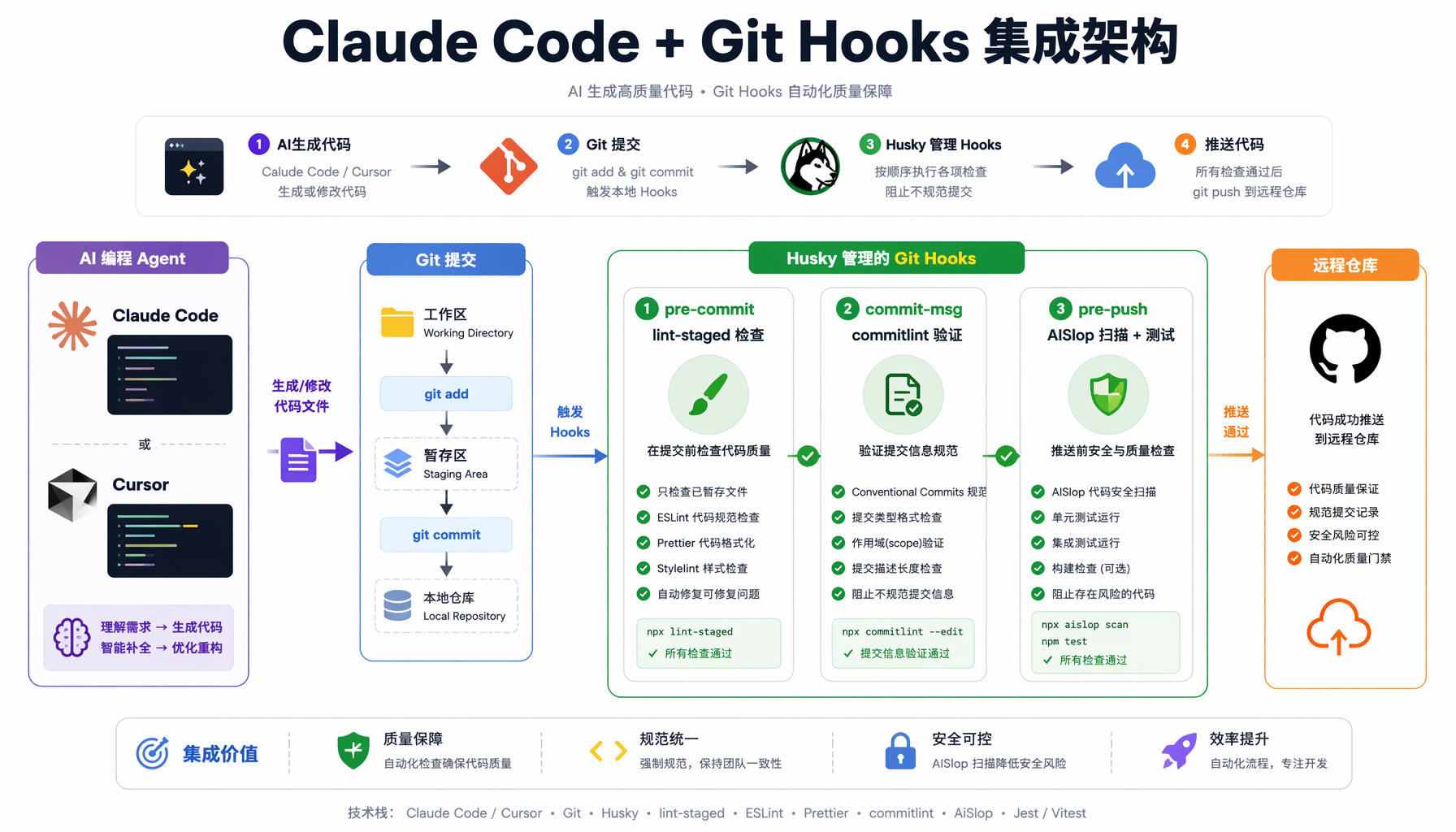
▲ 图2:SaaS 创业团队实施 Git Hooks 前后的效果对比
排障指南
问题 1:AISlop 误报太多
症状:AISlop 对合理的代码模式也报警(如必要的 as any 用于第三方库类型不完整的情况)
解决:在项目根目录创建 .aisloprc.json:
{
"rules": {
"ts-no-as-any": {
"level": "warn",
"allowInTestFiles": true,
"allowInTypeDefinitionFiles": true
},
"ts-no-silent-catch": {
"level": "error"
},
"hallucination-import": {
"level": "error"
}
},
"threshold": 70
}
问题 2:Husky hooks 不触发
症状:git commit 时 hooks 没有任何反应
排查:
# 1. 检查 husky 是否正确安装
ls -la .husky/pre-commit
# 应该有执行权限
# 2. 检查 Git hooks 路径
git config core.hooksPath
# 应该输出 .husky
# 3. 手动运行测试
sh .husky/pre-commit
# 如果有错误信息,针对性修复
# 4. 重新初始化
npx husky init
问题 3:pre-push 太慢
症状:git push 需要等待 30+ 秒
优化:
- AISlop 全量扫描改为仅扫描变更文件
- 安全扫描限制在暂存区而非全仓库
- 测试使用
--onlyChanged 参数(Jest)
# 优化后的 pre-push
CHANGED_FILES=$(git diff --name-only HEAD origin/main 2>/dev/null || echo ".")
npx aislop scan $CHANGED_FILES # 只扫描变更文件
常见问题(FAQ)
Q1: Hooks 会不会太慢,影响开发体验?
A: lint-staged 只检查暂存区的改动文件,不是全项目扫描。实测 50 个文件改动,全部检查在 3-5 秒内完成。如果项目特别大,可以用 --concurrent 并行执行。
Q2: AI 写的测试代码也应过 Hook 吗?
A: 测试代码同样需要质量检查,但可以放宽标准。在 lint-staged 中为测试文件单独配置:
{
"lint-staged": {
"*.test.{ts,tsx}": [
"prettier --write"
],
"*.{ts,tsx}": [
"prettier --write",
"eslint --fix",
"aislop check --files"
]
}
}
Q3: 紧急修复时可以跳过 Hooks 吗?
A: 可以,但不建议成为习惯。使用 git commit --no-verify 或 git push --no-verify 可以跳过。建议在团队规范中明确:跳过 hooks 需要在 PR 描述中说明原因。
Q4: Claude Code 和 Cursor 的 Agent 模式会自动运行 hooks 吗?
A: 会。Git hooks 是 Git 层面的机制,不管你用什么工具提交代码,hooks 都会触发。这正是它的优势——对工具无感知。
Q5: 小团队/个人项目值得配吗?
A: 绝对值得。小团队/个人项目更依赖 AI 编程 Agent,更需要自动化质检。配置成本约 15 分钟,收益是持续的代码质量保障。尤其是当你晚上 11 点让 Claude Code 写了个功能直接推送——hooks 就是你的最后一道防线。
行动清单
- 今天:安装 husky + lint-staged,配置基础 pre-commit hook(15 分钟)
- 本周:加入 AISlop 检查,创建 CLAUDE.md 项目规范(20 分钟)
- 本月:完善 pre-push 终检,加入安全扫描和测试门禁(30 分钟)
- 持续:根据团队反馈调整规则阈值,更新 AI 代码黑名单模式
风险提醒
- Git hooks 是本地机制,依赖每个开发者正确安装。建议在 CI/CD 中做冗余检查
- AISlop 等工具仍在快速迭代,规则可能产生误报。建议先观察一周再调高阈值
- 过于严格的 hooks 可能导致开发者绕过(频繁使用 --no-verify)。平衡严格度和开发体验
#AI创业 #ClaudeCode #GitHooks #AI编程 #代码质量 #Agent工坊
本文由AI辅助创作,经人工审核编辑发布