2026年最硬核的AI Agent技能不是会用工具,而是会造工具。FastMCP让你用30行Python代码给Claude Code、Cursor、OpenClaw装上自定义武器。
前言:为什么你要学会写MCP Server
先看三个真实场景:
场景一:你想让Claude Code每次写完代码自动查你的内部API文档,但Claude Code不认识你的私有系统。
场景二:你维护着一个Notion知识库,Cursor Agent读不了——它只认识文件和终端。
场景三:你在做竞品监控,每天手动打开5个网站复制数据到Excel,AI Agent帮不上忙——它不会打开浏览器。
这三个问题的答案都是同一个:MCP Server。
MCP(Model Context Protocol)是Anthropic在2024年底推出的开放协议,2026年已经成为AI Agent生态的基础设施。它的核心思想很简单:给AI模型一个统一的接口,让它能调用任何外部工具——不管是查数据库、调API、读文件还是控制浏览器。
到2026年5月,MCP生态已经非常成熟。GitHub上有超过2000个开源MCP Server,覆盖了从Google Drive到PostgreSQL、从Slack到Playwright的所有主流工具。但真正的威力不在于安装别人写的Server——在于你自己写一个。
这篇文章带你用FastMCP(Python生态最流行的MCP框架),从零到一搭建一个可用的MCP Server,并接入Claude Code实测。全程30行核心代码,15分钟跑通。
环境准备
开始前确认你的环境:
- Python 3.10+(FastMCP要求)
- Claude Code已安装(或Cursor/Cline,MCP协议通用)
- pip可用
# 确认Python版本
python3 --version # 应输出 3.10 或更高
# 确认Claude Code已安装
claude --version
安装FastMCP
验证安装:
python3 -c "import fastmcp; print(fastmcp.__version__)"
# 输出类似: 2.x.x
FastMCP 2.x是2026年最新主版本,API相比1.x更简洁,支持异步、类型提示、自动文档生成——后面会详细演示。
核心概念:3个你必须知道的东西
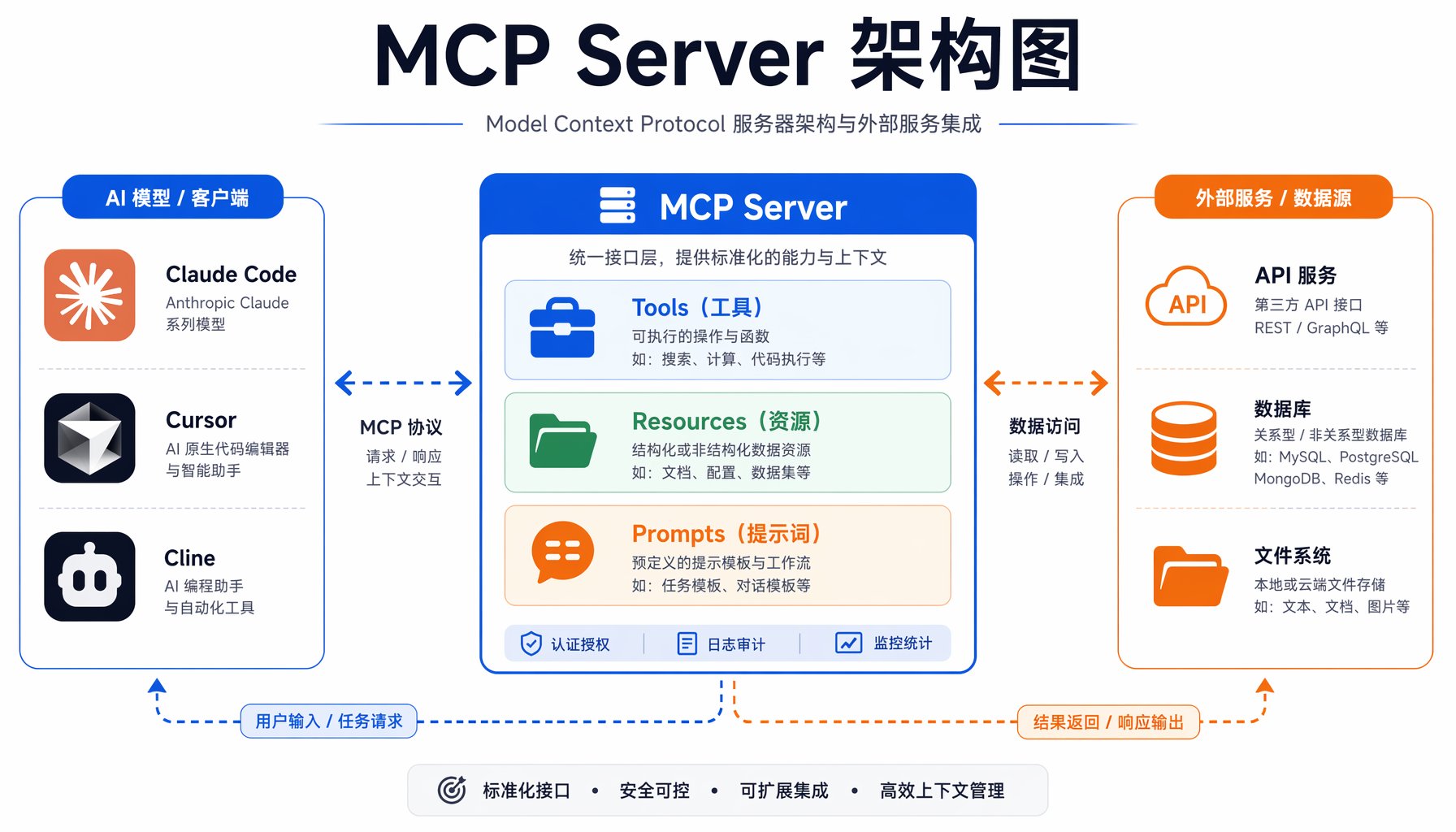
▲ MCP Server 架构:AI模型通过统一协议调用Tools、Resources、Prompts
在写代码之前,先理解MCP的三个核心组件:
1. Tools(工具)
这是MCP Server最核心的部分。一个Tool就是一个函数,AI可以调用它来执行某个操作。比如:
get_weather(city) → 查天气search_docs(keyword) → 搜索文档send_slack_message(channel, text) → 发Slack消息
每个Tool有明确的输入(参数)和输出(返回值),AI通过函数签名就知道怎么调用。
2. Resources(资源)
Resources是AI可以"读取"的数据。和Tool不同,Resource不执行操作,只是暴露数据:
config://app → 应用配置docs://api-reference → API参考文档database://users → 用户列表
3. Prompts(提示模板)
预定义的提示词模板,AI可以根据场景选择使用:
对于入门来说,Tools是你最先需要掌握的。下面我们就从Tools开始。
实战一:5分钟搭建天气查询MCP Server
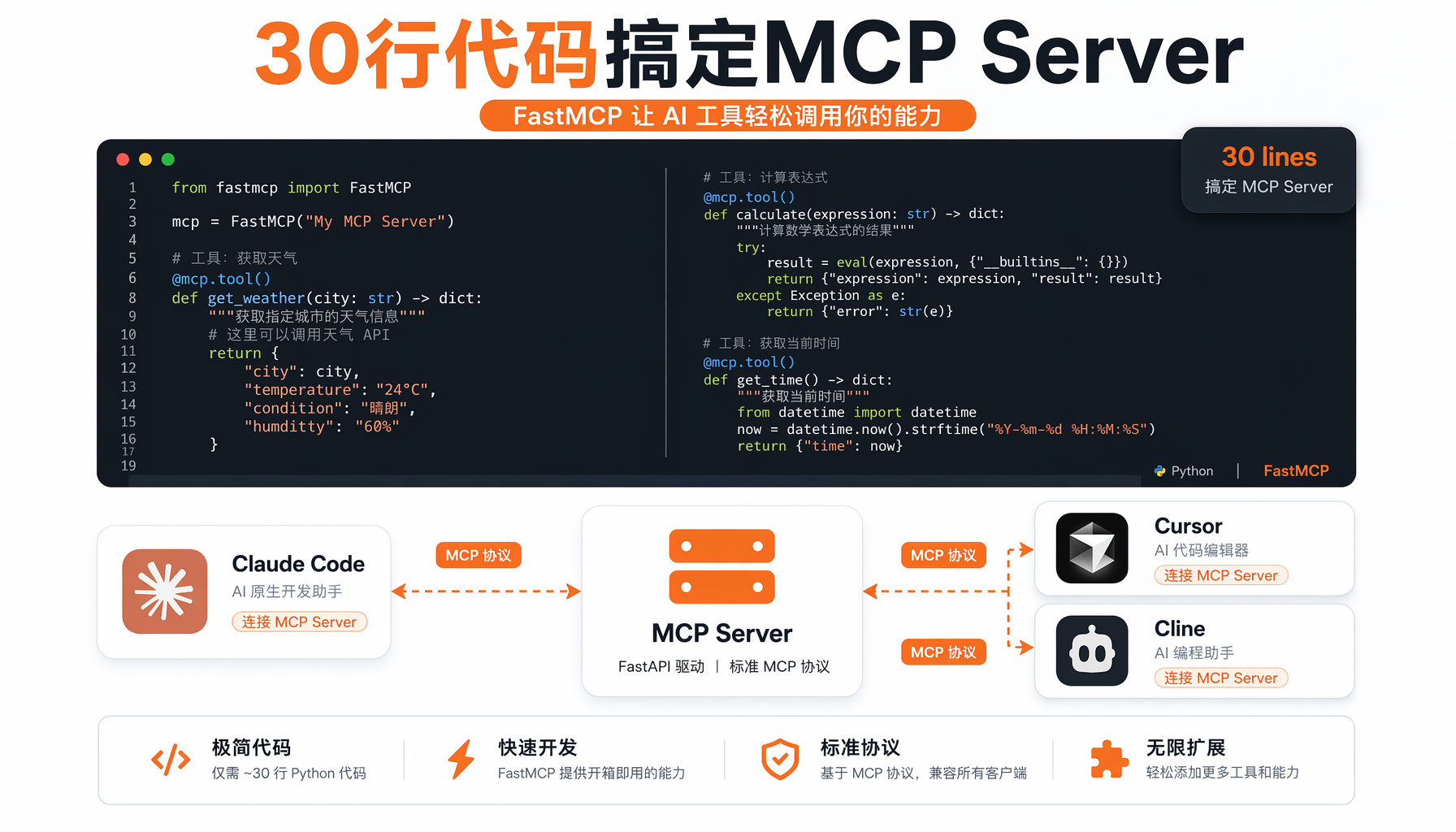
▲ FastMCP核心代码:@mcp.tool()装饰器让普通函数变成AI可调用的工具
先从最简单的开始——让AI能查天气。
# weather_server.py
from fastmcp import FastMCP
# 创建MCP Server实例
mcp = FastMCP("Weather Server")
@mcp.tool()
def get_weather(city: str) -> str:
"""查询指定城市的天气信息
Args:
city: 城市名称,如"北京"、"上海"
"""
# 实际项目中这里调天气API
# 这里用模拟数据演示
weather_data = {
"北京": "晴,25°C,湿度45%,风力3级",
"上海": "多云,28°C,湿度65%,风力2级",
"深圳": "阵雨,30°C,湿度80%,风力4级",
}
return weather_data.get(city, f"未找到{city}的天气数据")
@mcp.tool()
def get_forecast(city: str, days: int = 3) -> str:
"""查询城市未来天气预报
Args:
city: 城市名称
days: 预报天数,默认3天
"""
forecasts = {
"北京": ["5月27日 晴 26°C", "5月28日 多云 24°C", "5月29日 阴 22°C"],
"上海": ["5月27日 多云 29°C", "5月28日 阵雨 27°C", "5月29日 阴 26°C"],
}
forecast_list = forecasts.get(city, [f"暂无{city}预报数据"])
return "\n".join(forecast_list[:days])
if __name__ == "__main__":
# 以stdio模式运行(Claude Code通过管道通信)
mcp.run()
保存后测试:
python3 weather_server.py
没错,就这么简单。@mcp.tool() 装饰器把一个普通Python函数变成了AI可以调用的工具。函数的docstring自动变成工具描述,类型提示自动变成参数schema——FastMCP帮你处理了所有协议细节。
接入Claude Code
编辑Claude Code的MCP配置文件:
# macOS/Linux
mkdir -p ~/.claude
cat >> ~/.claude/mcp.json << 'EOF'
{
"mcpServers": {
"weather": {
"command": "python3",
"args": ["/完整路径/weather_server.py"]
}
}
}
EOF
重启Claude Code后,在对话中试试:
你:北京今天天气怎么样?
Claude:[调用 get_weather(city="北京")]
北京今天晴,25°C,湿度45%,风力3级。
你:上海未来5天呢?
Claude:[调用 get_forecast(city="上海", days=5)]
5月27日 多云 29°C
5月28日 阵雨 27°C
5月29日 阴 26°C
(后2天暂无数据)
恭喜,你已经让AI调用了你写的函数。
实战二:竞品监控MCP Server(一人公司刚需)
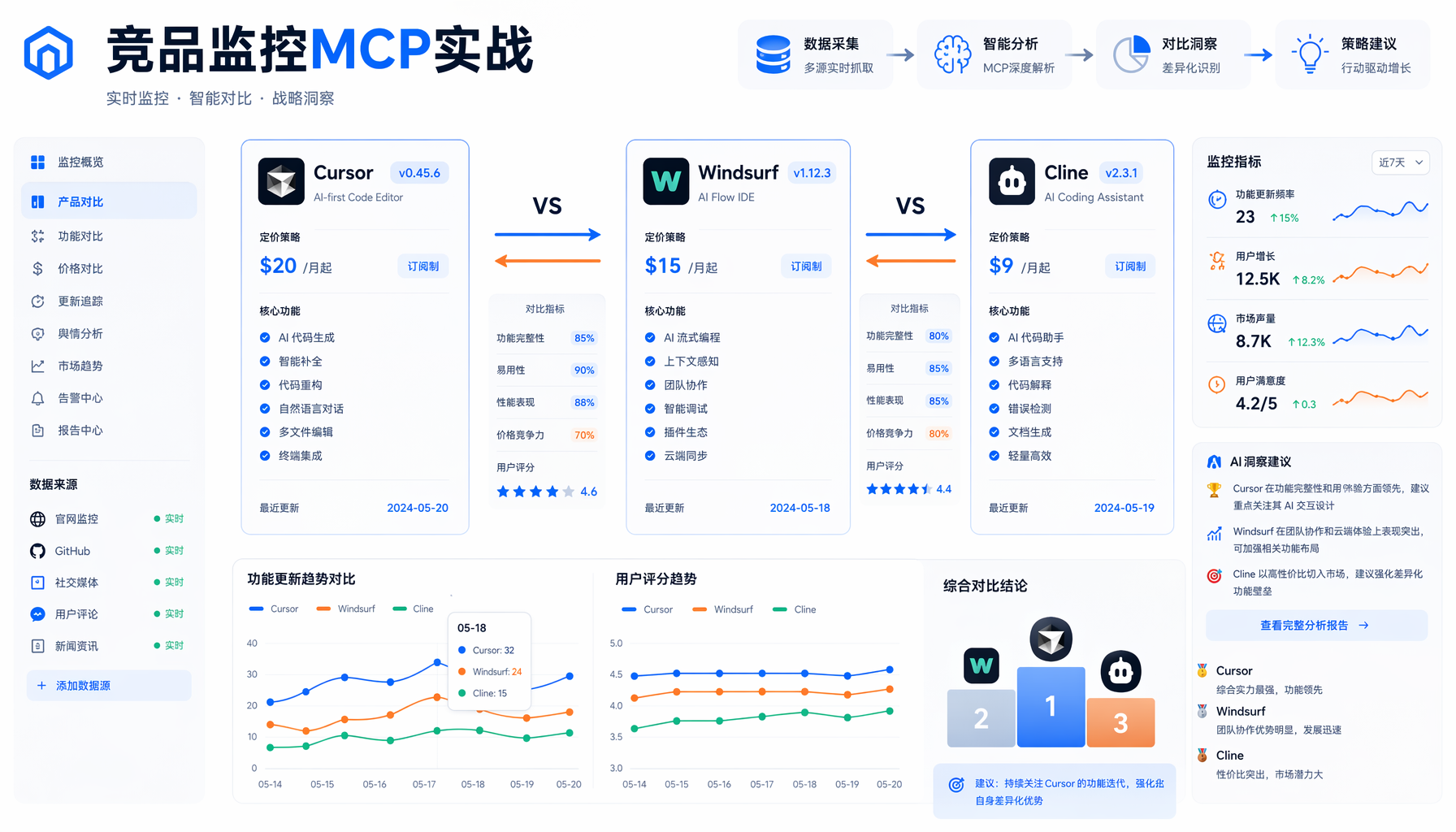
▲ 竞品监控MCP实战:Cursor vs Windsurf vs Cline 对比仪表盘
上面的天气示例很简单。下面做一个真正有用的——竞品监控MCP Server,自动抓取和分析竞品信息。
# competitor_monitor.py
from fastmcp import FastMCP
import json
from datetime import datetime
mcp = FastMCP("Competitor Monitor")
# 模拟的竞品数据库(实际项目中接真实数据源)
COMPETITOR_DB = {
"cursor": {
"name": "Cursor",
"latest_version": "0.48.0",
"last_update": "2026-05-20",
"pricing": {"free": "2000次补全/月", "pro": "$20/月"},
"key_features": ["Agent模式", "Composer", "多文件编辑", "MCP支持"],
"recent_news": "Cursor 0.48新增团队协作功能,支持共享Rules"
},
"windsurf": {
"name": "Windsurf",
"latest_version": "2.8.0",
"last_update": "2026-05-18",
"pricing": {"free": "有限制", "pro": "$15/月"},
"key_features": ["Cascade AI流", "多文件上下文", "终端集成"],
"recent_news": "Windsurf 2.8大幅提升大型项目上下文处理能力"
},
"cline": {
"name": "Cline",
"latest_version": "3.9.0",
"last_update": "2026-05-22",
"pricing": {"free": "开源免费", "pro": "N/A"},
"key_features": ["VSCode集成", "自定义MCP Server", "Plan/Act模式"],
"recent_news": "Cline 3.9支持自定义Agent角色和工作流"
}
}
@mcp.tool()
def search_competitor(name: str) -> str:
"""搜索竞品信息
Args:
name: 竞品名称,如 cursor, windsurf, cline
"""
name_lower = name.lower()
if name_lower in COMPETITOR_DB:
info = COMPETITOR_DB[name_lower]
return json.dumps(info, ensure_ascii=False, indent=2)
# 模糊匹配
for key, info in COMPETITOR_DB.items():
if name_lower in key or key in name_lower:
return json.dumps(info, ensure_ascii=False, indent=2)
return f"未找到竞品「{name}」的信息。已知竞品:{', '.join(COMPETITOR_DB.keys())}"
@mcp.tool()
def compare_competitors(competitor_a: str, competitor_b: str) -> str:
"""对比两个竞品
Args:
competitor_a: 第一个竞品名称
competitor_b: 第二个竞品名称
"""
a = COMPETITOR_DB.get(competitor_a.lower())
b = COMPETITOR_DB.get(competitor_b.lower())
if not a or not b:
missing = competitor_a if not a else competitor_b
return f"未找到竞品「{missing}」"
comparison = f"""## {a['name']} vs {b['name']}
| 维度 | {a['name']} | {b['name']} |
|------|-------------|-------------|
| 最新版本 | {a['latest_version']} | {b['latest_version']} |
| 最近更新 | {a['last_update']} | {b['last_update']} |
| 免费版 | {a['pricing']['free']} | {b['pricing']['free']} |
| 付费版 | {a['pricing']['pro']} | {b['pricing']['pro']} |
| 核心特性 | {', '.join(a['key_features'][:3])} | {', '.join(b['key_features'][:3])} |
### {a['name']} 最新动态
{a['recent_news']}
### {b['name']} 最新动态
{b['recent_news']}
"""
return comparison
@mcp.tool()
def list_competitors() -> str:
"""列出所有监控中的竞品"""
result = "当前监控的竞品:\n\n"
for key, info in COMPETITOR_DB.items():
result += f"- **{info['name']}** (v{info['latest_version']}) — {info['pricing']['pro']}\n"
return result
@mcp.tool()
def generate_report() -> str:
"""生成本周竞品监控报告"""
report = f"""# 竞品监控周报
**生成时间**:{datetime.now().strftime('%Y-%m-%d %H:%M')}
## 本周要点
"""
for key, info in COMPETITOR_DB.items():
report += f"""### {info['name']} v{info['latest_version']}
- 最近更新:{info['last_update']}
- 最新动态:{info['recent_news']}
- 当前定价:{info['pricing']['pro']}
"""
return report
if __name__ == "__main__":
mcp.run()
这个Server提供了4个Tool:
search_competitor — 查单个竞品compare_competitors — 对比两个竞品list_competitors — 列出全部generate_report — 生成周报
接入Claude Code后,你可以直接说:"帮我生成这周的竞品监控报告",Claude就会调用 generate_report(),把结果整理好返回给你。
实战三:接入真实API——让MCP Server调用外部服务
上面两个示例的数据都是硬编码的。实际场景中,你的MCP Server需要调真实API、查数据库、读文件。下面演示如何接入真实数据源:
# real_api_server.py
from fastmcp import FastMCP
import httpx # pip install httpx
mcp = FastMCP("Real API Server")
@mcp.tool()
async def search_github_repos(query: str, limit: int = 5) -> str:
"""搜索GitHub仓库
Args:
query: 搜索关键词
limit: 返回数量,默认5个
"""
async with httpx.AsyncClient() as client:
response = await client.get(
"api.github.com/search/repositories",
params={"q": query, "per_page": limit, "sort": "stars"},
headers={"Accept": "application/vnd.github.v3+json"},
timeout=30.0
)
data = response.json()
result = f"## GitHub搜索「{query}」结果\n\n"
for repo in data.get("items", []):
result += f"- **{repo['full_name']}** ⭐{repo['stargazers_count']}\n"
result += f" {repo['description'][:100]}\n"
result += f" 语言:{repo['language']} | 更新:{repo['updated_at'][:10]}\n\n"
return result
@mcp.tool()
async def get_hn_hot(limit: int = 10) -> str:
"""获取Hacker News热门文章
Args:
limit: 返回数量,默认10条
"""
async with httpx.AsyncClient() as client:
# 获取热门文章ID
resp = await client.get(
"hacker-news.firebaseio.com/v0/topstories",
timeout=15.0
)
story_ids = resp.json()[:limit]
result = "## Hacker News 热榜\n\n"
for i, sid in enumerate(story_ids, 1):
story = await client.get(
f"hacker-news.firebaseio.com/v0/item/",
timeout=10.0
)
s = story.json()
result += f"{i}. **{s.get('title', 'N/A')}** — {s.get('score', 0)}分 {s.get('descendants', 0)}评论\n"
return result
if __name__ == "__main__":
mcp.run()
注意:这里的函数用了 async def。FastMCP 2.x 完全支持异步——如果你的Tool需要调外部API(通常用异步HTTP客户端更快),记得加 async。
接入Claude Code的完整步骤
第一步:找到你的MCP配置文件
# Claude Code配置目录
ls ~/.claude/
# 如果不存在mcp.json,创建一个
touch ~/.claude/mcp.json
第二步:注册你的Server
编辑 ~/.claude/mcp.json:
{
"mcpServers": {
"weather": {
"command": "python3",
"args": ["/Users/yourname/mcp/weather_server.py"]
},
"competitor": {
"command": "python3",
"args": ["/Users/yourname/mcp/competitor_monitor.py"]
},
"real-api": {
"command": "python3",
"args": ["/Users/yourname/mcp/real_api_server.py"]
}
}
}
第三步:重启Claude Code并验证
重启后,在对话中输入:
Claude会列出所有已注册的工具。确认你的Server在列表中。
第四步:开始使用
Claude会自动调用 compare_competitors("cursor", "windsurf") 并呈现结果。
Cursor和Cline的配置方式
MCP是通用协议,不仅限于Claude Code。
Cursor配置
编辑 ~/.cursor/mcp.json(格式与Claude Code相同):
{
"mcpServers": {
"competitor": {
"command": "python3",
"args": ["/path/to/competitor_monitor.py"]
}
}
}
Cline配置
在VSCode设置中搜索 "Cline MCP",或在 .cline/mcp_settings.json:
{
"mcpServers": {
"competitor": {
"command": "python3",
"args": ["/path/to/competitor_monitor.py"]
}
}
}
踩坑与排障
1. Python路径问题
症状:Claude Code报 "command not found: python3"
解决:用完整路径:
{
"command": "/usr/local/bin/python3",
"args": ["/full/path/to/server.py"]
}
2. 依赖缺失
症状:ImportError: No module named 'fastmcp'
解决:确保在正确的Python环境中安装了FastMCP:
which python3
python3 -m pip install fastmcp httpx
3. 函数类型提示不完整
症状:AI无法正确推断参数类型
解决:始终给参数加类型提示和docstring。FastMCP依赖它们生成Tool schema:
# ❌ 不好——AI不知道city应该是什么
@mcp.tool()
def get_weather(city):
...
# ✅ 好——类型清晰
@mcp.tool()
def get_weather(city: str) -> str:
"""查询指定城市的天气信息
Args:
city: 城市名称,如"北京"
"""
4. 异步函数忘记await
症状:返回coroutine对象而非实际结果
解决:异步Tool记得加 async/await:
@mcp.tool()
async def fetch_data(url: str) -> str:
async with httpx.AsyncClient() as client:
resp = await client.get(url)
return resp.text
5. MCP Server启动失败无报错
症状:Claude Code不显示你的工具
解决:先手动测试Server能否启动:
python3 your_server.py
# 应该挂起等待stdio输入(正常行为——说明启动成功了)
# Ctrl+C 退出
进阶:Resources和Prompts
掌握了Tools之后,可以进一步探索Resources和Prompts。
Resources示例
@mcp.resource("config://app")
def get_app_config() -> str:
"""返回应用配置"""
return json.dumps({
"app_name": "AI创业内参",
"version": "2.0",
"environment": "production"
})
@mcp.resource("docs://style-guide")
def get_style_guide() -> str:
"""返回写作风格指南"""
return """# 写作风格指南
- 正文16px,行高1.8
- 标题用深蓝色 #1a237e
- 强调用深橙色 #BF360C
- 每段不超过5行
"""
Prompts示例
@mcp.prompt()
def code_review_prompt(language: str = "Python") -> str:
"""生成代码审查提示"""
return f"""请审查以下{language}代码,关注:
1. 安全性问题
2. 性能瓶颈
3. 可读性和命名规范
4. 错误处理是否完善
请给出具体的改进建议和修改后的代码。"""
@mcp.prompt()
def weekly_report_prompt() -> str:
"""生成周报提示"""
return """请基于以下数据生成本周工作报告:
- 完成的任务及耗时
- 遇到的关键问题和解决方案
- 下周计划
- 需要的资源支持
格式要求:简洁、有数据支撑、突出成果。"""
常见问题(FAQ)
Q: MCP Server和直接写Python脚本有什么区别?
A: Python脚本需要你手动调用。MCP Server让AI自动发现和调用你的函数——你说"帮我查天气",AI就知道调哪个Tool、传什么参数。
Q: 一定要用FastMCP吗?
A: 不必须。Anthropic官方有Python SDK(mcp包),但FastMCP更简洁——用装饰器替代手动注册,减少80%样板代码。
Q: MCP Server能部署到服务器上吗?
A: 可以。FastMCP支持SSE(Server-Sent Events)传输模式,可以部署为HTTP服务供远程调用。但入门阶段先用本地stdio模式。
Q: 安全性怎么保障?
A: MCP Server运行在你的机器上,权限等同于你的用户。不要在Server里执行不可信输入的命令。Tool的参数应该做校验和清洗。
Q: 能同时给多个AI工具用同一个MCP Server吗?
A: 可以。stdio模式下每个AI工具启动独立进程。HTTP模式(SSE)下可以多客户端共享一个Server实例。
总结
MCP Server开发是2026年AI创业者最值得掌握的技术技能之一。它的价值不在于技术复杂度——FastMCP让开发门槛降到最低。真正的价值在于:你不再受限于现成工具。
- 你的内部API文档?写个MCP Server让AI自动查询。
- 竞品每天更新?写个MCP Server让AI自动对比。
- 数据处理流程繁琐?写个MCP Server让AI替你执行。
30行代码,15分钟,你就从"AI工具的使用者"变成了"AI工具的创造者"。
下一步建议:
- 把本文的天气查询Server跑通
- 改造竞品监控Server接入你自己的数据源
- 浏览GitHub上mcp-servers官方仓库找灵感
- 一周内写一个属于你自己的MCP Server
本文由AI辅助创作,经人工审核编辑发布。
本文由AI辅助创作,经人工审核编辑发布