
多智能体协作不再是概念——用Kanban让AI团队自动完成任务,用/goal让每个Agent死咬目标不放。
前言
你有没有遇到过这种情况:给AI Agent布置了一个任务,聊着聊着它就跑偏了?或者更糟——它中途"死了"(session断了),你回来发现进度归零,一切从头开始?
这不是你的问题,是所有AI Agent的固有问题。Claude有上下文窗口限制,GPT有token预算,任何一个长任务都面临"遗忘"和"中断"两个杀手。
Hermes Agent v0.13.0(2026年5月7日发布)针对这两个问题给出了系统级的答案:Kanban 把任务拆成多个Agent协同执行,/goal 让单个Agent跨轮次死咬目标不放。两者结合,就是一套"AI不会半途而废"的工程方案。
这篇文章带你从零搭建一个Kanban多智能体工作流,再用/goal给它上"目标锁"——每一步都有代码、有输出示例、有踩坑提醒。
什么是 Kanban?——不只是"任务面板"
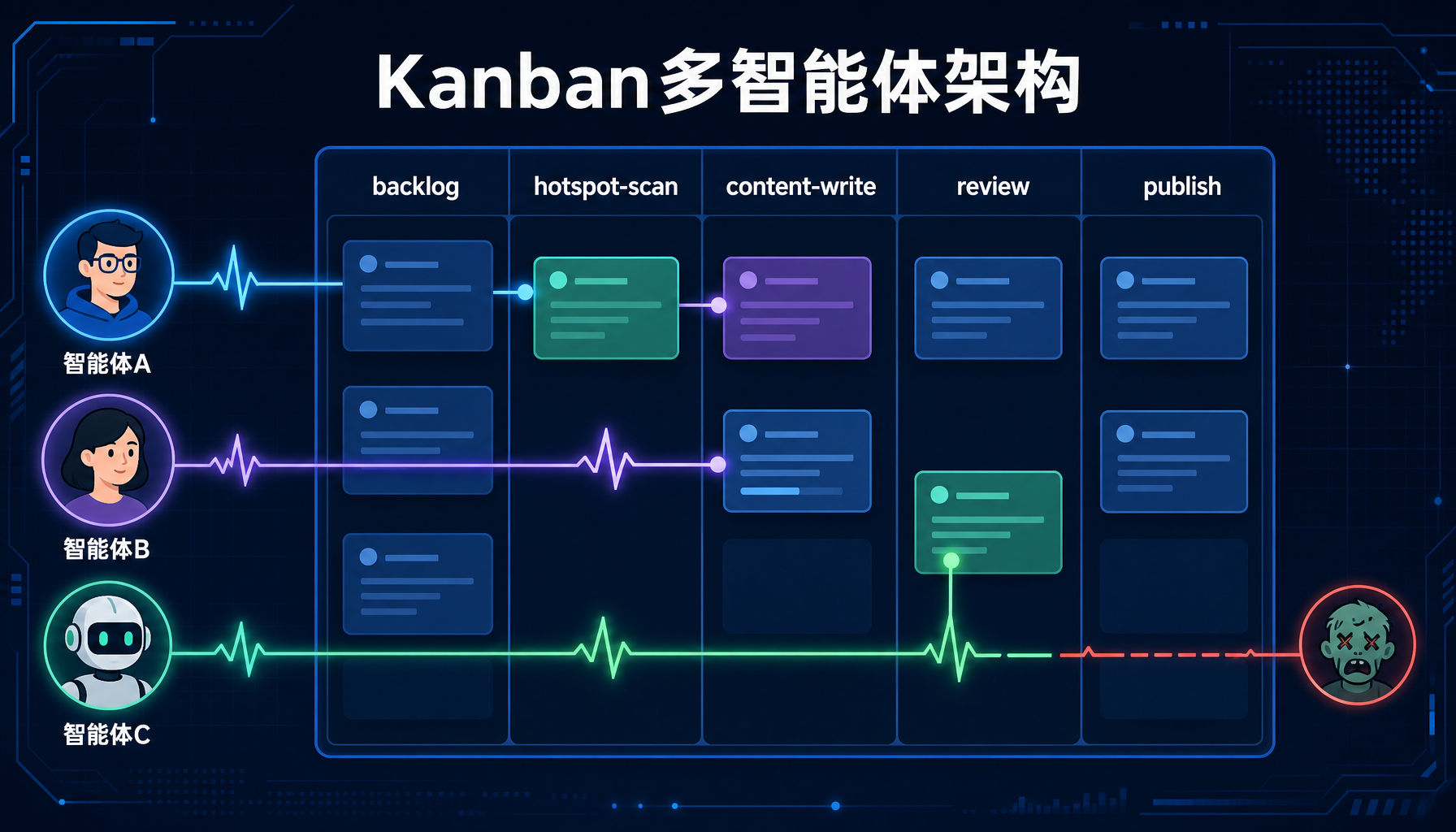
▲ 图1:Kanban多智能体协作架构——5列看板+3个Worker+心跳+僵尸检测
很多工具都有"任务面板",但Hermes的Kanban不一样。它不是给你看的待办清单,而是给多个Agent worker看的协作协议。一个Kanban panel包含以下机制:
| 组件 | 做什么 |
|---|---|
| Heartbeat(心跳) | 每个worker定期发心跳,确认自己还活着 |
| Reclaim(回收) | 如果worker心跳超时,它的任务会被自动回收,分配给其他worker |
| Zombie detection(僵尸检测) | 检测"假活着"的worker(心跳正常但不干活的) |
| Auto-block on incomplete exit | 任务没完成就退出?自动打回,不偷偷溜走 |
| Per-task retries | 每个任务独立重试预算,不因一个任务失败拖垮整个面板 |
| Hallucination recovery | Agent产出幻觉内容?Kanban检测到后自动触发恢复流程 |
一句话总结:Kanban是一个"Agent不会摸鱼、不会跑路、不会说胡话"的任务系统。
实战1:创建你的第一个Kanban
▲ 图2:hermes kanban status命令实时输出——任务分布、Worker心跳、进度统计
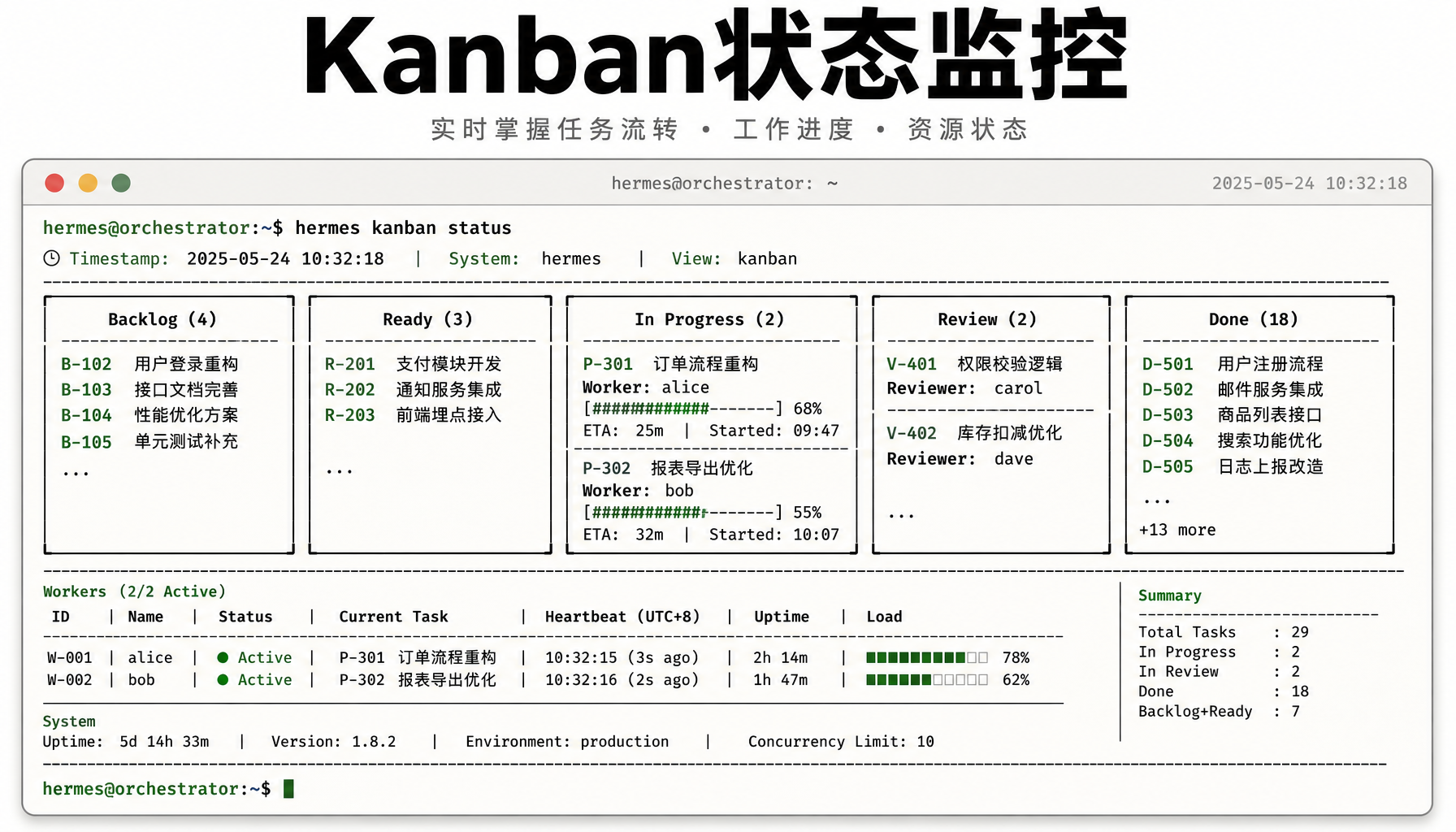
▲ 图2:hermes kanban status命令实时输出——任务分布、Worker心跳、进度统计
前提条件
# 确保已安装 Hermes Agent v0.13.0+
hermes --version
输出:hermes-agent v2026.5.7 (v0.13.0)
如果你还在旧版本,先升级
hermes upgrade
Step 1:创建一个Kanban面板
# 创建一个名为 "content-pipeline" 的Kanban
hermes kanban create content-pipeline \
--description "AI内容生产流水线" \
--columns "todo,research,writing,review,done"
输出示例:
╭─────────────────────────────────────────────────╮
│ 🗂  Kanban "content-pipeline" created            │
│                                                  │
│  Columns: todo → research → writing → review → done │
│  Workers: 0 (auto-scale enabled)                 │
│  Heartbeat interval: 30s                         │
│  Reclaim timeout: 120s                           │
│  Retry budget per task: 3                        │
│                                                  │
│  📋 No tasks yet. Add your first task:           │
│     hermes kanban add-task content-pipeline \    │
│       "Research AI agent tools" \                │
│       --column todo                              │
╰─────────────────────────────────────────────────╯
Step 2:添加任务并分配worker
# 添加3个任务
hermes kanban add-task content-pipeline \
"调研最新AI Agent框架(Hermes/OpenClaw/Claude Code)" \
--column todo
hermes kanban add-task content-pipeline \
"撰写对比评测文章(2500字+代码示例)" \
--column todo


hermes kanban add-task content-pipeline \
"文章排版+配图+发布到公众号草稿箱" \
--column todo


启动2个worker来干活
hermes kanban start content-pipeline --workers 2
输出示例:
╭─────────────────────────────────────────────────╮
│ 🚀 Kanban "content-pipeline" started             │
│                                                  │
│  Workers: 2 (worker-1, worker-2)                 │
│  Worker-1 picked up: "调研最新AI Agent框架"      │
│    → moved to column: research                   │
│  Worker-2 picked up: "撰写对比评测文章"          │
│    → moved to column: writing                    │
│                                                  │
│  ⏳ Remaining in todo: 1 task                    │
│  💓 Heartbeat monitoring active                  │
╰─────────────────────────────────────────────────╯
Step 3:监控Kanban状态
# 实时查看Kanban状态
hermes kanban status content-pipeline --watch
输出示例:
┌─ Kanban: content-pipeline ───────────────────────┐
│ todo (1) │ research (1) │ writing (1) │ review (0) │ done (0) │
│                                                  │
│ 🤖 Worker-1 [research] 💓 3s ago                 │
│    📝 调研最新AI Agent框架                         │
│    Progress: researching Hermes Agent v0.13.0...  │
│                                                  │
│ 🤖 Worker-2 [writing] 💓 12s ago                  │
│    📝 撰写对比评测文章                              │
│    Progress: drafting outline...                  │
│                                                  │
│ 📊 Stats: 2 active, 0 zombies, 0 failed          │
└──────────────────────────────────────────────────┘
⚠️ 踩坑1:如果你在Kanban启动后关闭了终端,worker会丢失。使用
hermes kanban daemon模式让worker变成后台守护进程,或者用Gateway的auto-resume功能(见下文)。
实战2:用 `/goal` 锁定目标——Agent不再跑偏
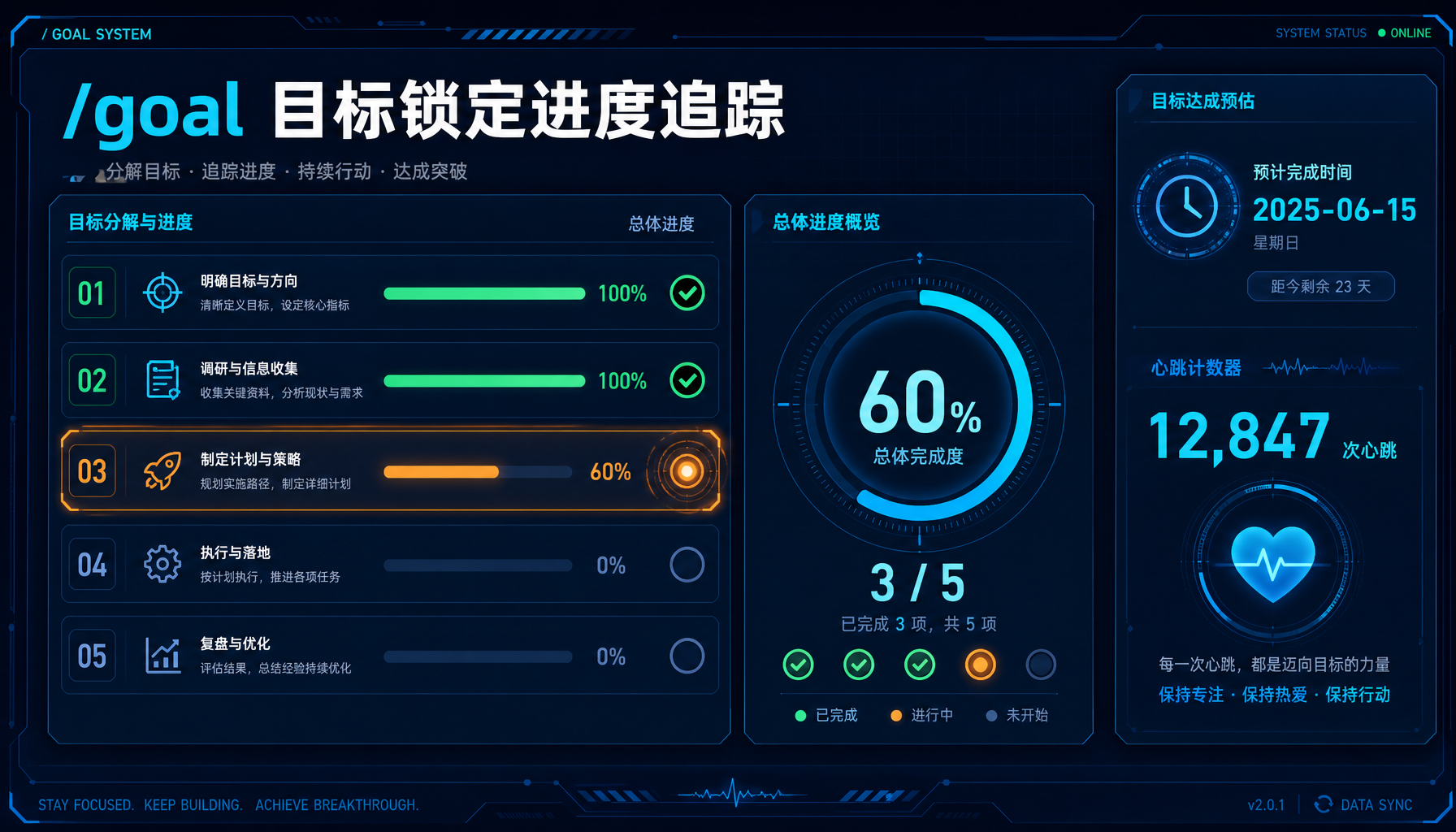
▲ 图3:/goal目标锁定进度追踪——5个子任务、60%完成度、预估剩余时间
Kanban解决了多任务协作,但单个worker在执行长任务时仍然可能"跑偏"。/goal 解决的就是这个问题。
/goal 的工作原理
/goal 是 v0.13.0 新增的一等公民原语(first-class primitive)。当你设置一个 goal 后:
- 每轮对话开始时,系统检查goal是否仍相关
- Agent产出偏离目标时,自动被拉回正轨
- 跨session恢复时,goal自动重新加载
- 支持子目标和进度追踪
Step 4:给worker设置/goal
在Kanban的worker上下文中设置goal:
# 进入某个worker的交互会话
hermes kanban attach content-pipeline --worker worker-1
在会话中设置goal
/goal "完成AI Agent框架调研报告,覆盖Hermes Agent v0.13.0、OpenClaw v2026.5.16-beta、Claude Code 2.1.0三大框架,每个框架至少包含:架构概述、核心功能、中文支持情况、适用场景"
Agent响应:
🎯 Goal set. I will focus on this objective across turns.
Subtasks identified:
- Research Hermes Agent v0.13.0 (Kanban, /goal, i18n)
- Research OpenClaw v2026.5.16-beta (Chinese localization, skill cache)
- Research Claude Code 2.1.0 (MCP, agent-teams)
- Write comparison report
- Verify data accuracy against GitHub releases
Progress: 0/5 | ETA: ~15 minutes
Step 5:查看goal执行进度
# 在另一个终端查看
hermes goal status
输出示例:
🎯 Active Goals
──────────────────────────────────────────────────
📋 Goal: "完成AI Agent框架调研报告..."
Worker: worker-1 (kanban: content-pipeline)
Progress: ████████░░░░░░░░░░ 3/5 (60%)
✅ 1. Hermes Agent v0.13.0 research
✅ 2. OpenClaw v2026.5.16-beta research
⏳ 3. Claude Code 2.1.0 research (in progress)
⬜ 4. Write comparison report
⬜ 5. Verify data accuracy


Last heartbeat: 8s ago 💓
Estimated completion: 6 minutes
⚠️ 踩坑2:
/goal设置后,Agent会非常"执着"——这意味着它可能忽略你后续提出的无关问题。如果你想临时"解除锁定",用/goal off;完成任务后用/goal done标记完成。
实战3:心跳+僵尸检测——让"装死"的Agent无处遁形
Kanban最酷的功能不是分配任务,而是它能发现谁在摸鱼。
心跳机制
每个worker默认每30秒发送一次心跳。如果一个worker超过120秒(可配置)没发心跳,Kanban认为它"可能死了",触发以下流程:
- Reclaim:该worker正在处理的任务被收回
- Reassign:任务重新放回原列,等待下一个可用worker
- Log:事件记录到Kanban日志
僵尸检测
更聪明的是"僵尸检测"——有些worker心跳正常(进程没死),但它在死循环里打转或不产生任何有意义的进度。v0.13.0的检测逻辑:
连续3个心跳周期内——
- 任务状态无变化
- 输出token增量 < 100
- 工具调用次数为0
Step 6:配置心跳和回收参数
# 自定义Kanban参数
hermes kanban update content-pipeline \
--heartbeat-interval 20s \
--reclaim-timeout 90s \
--zombie-threshold 3 \
--retry-budget 5
输出示例:
╭─────────────────────────────────────────────────╮
│ ⚙️ Kanban "content-pipeline" updated │
│ │
│ Heartbeat interval: 20s (was 30s) │
│ Reclaim timeout: 90s (was 120s) │
│ Zombie threshold: 3 cycles (unchanged) │
│ Retry budget: 5 per task (was 3) │
│ │
│ ⚠️ Shorter intervals = more responsive │
│ but higher CPU usage for large kanbans │
╰─────────────────────────────────────────────────╯
⚠️ 踩坑3:不要把 reclaim-timeout 设得太短!如果你的worker在执行网络请求(如调用API、fetch网页),30-60秒的延迟很常见。建议 reclaim-timeout 至少是预期最长单步时间的3倍。设成30秒的话,worker可能刚发出一个GPT-5.5的请求(耗时20-30秒),就被判定为"死亡"回收了——结果任务被执行了两次。
实战4:Gateway自动恢复——重启后无缝继续
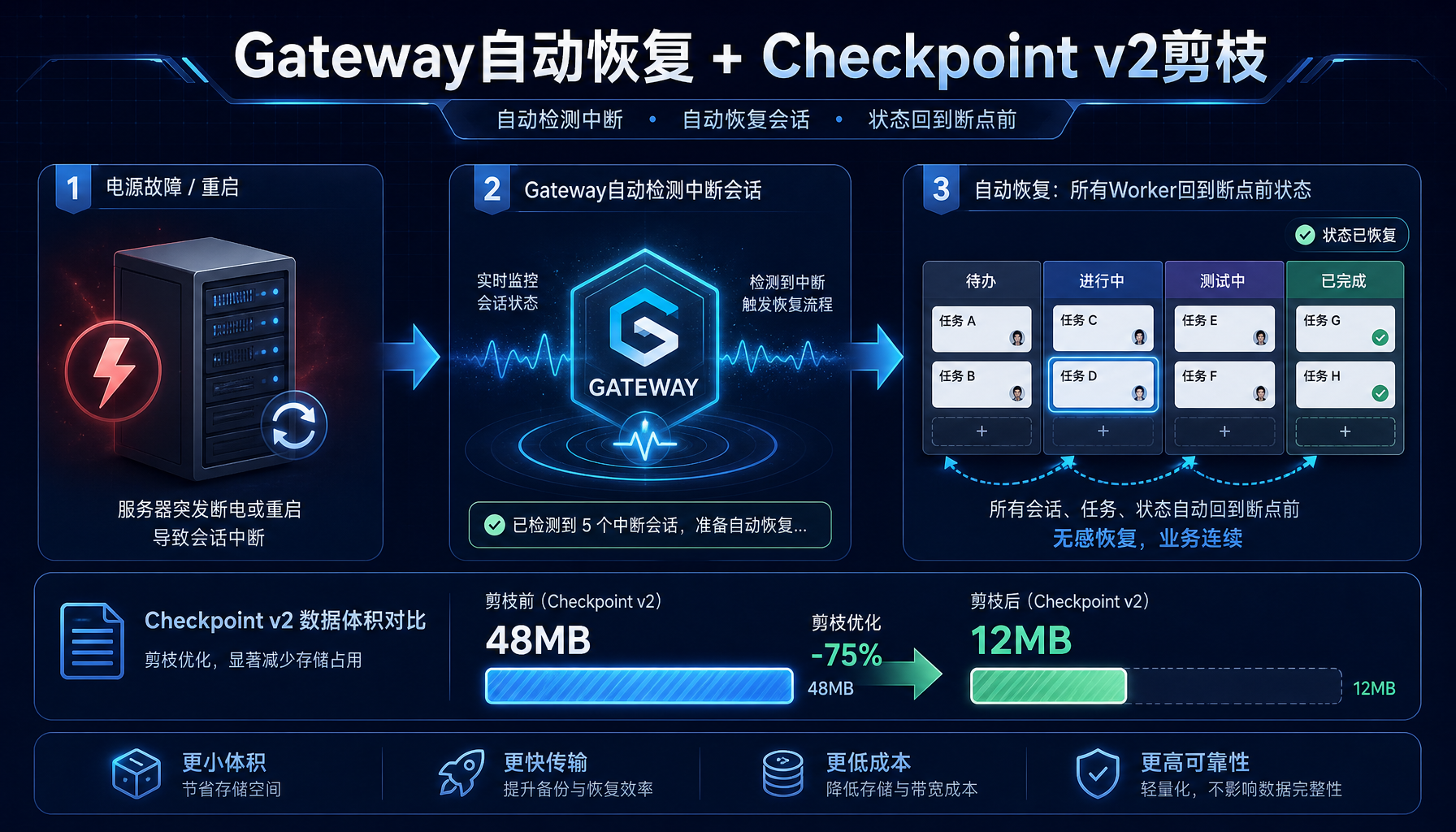
▲ 图4:Gateway自动恢复流程——从断电重启到Kanban无缝继续,Checkpoint v2剪枝48MB→12MB
这是v0.13.0最被低估的功能。Hermes Agent的Gateway现在支持自动恢复中断的session。
场景模拟
# 假设服务器重启或Hermes进程崩溃
重启后:
hermes gateway start
Gateway自动检测到未完成的session
输出示例:
╭─────────────────────────────────────────────────╮
│ 🔄 Gateway auto-resume triggered │
│ │
│ Found 2 interrupted sessions: │
│ 📋 Kanban "content-pipeline" │
│ - worker-1: "调研最新AI Agent框架" (60% done)│
│ - worker-2: "撰写对比评测文章" (30% done) │
│ │
│ ✅ All sessions resumed from checkpoint v2 │
│ 📊 State pruned: 48MB → 12MB (75% saved) │
│ │
│ Gateway ready on port 18765 │
╰─────────────────────────────────────────────────╯
Checkpoint v2 的改进
v0.13.0重写了状态持久化。Checkpoint v2引入真正的剪枝:
- 旧版Checkpoint v1:每次保存完整状态快照,一个长任务可能积累几百MB的checkpoint
- Checkpoint v2:只保存差异(delta),并定期剪枝合并。实测48MB→12MB
# 查看checkpoint状态
hermes checkpoint list
手动触发剪枝
hermes checkpoint prune --older-than 7d
输出示例:
╭─────────────────────────────────────────────────╮
│ 💾 Checkpoints │
│ │
│ Total: 127 entries │
│ Disk usage: 12.4MB (pruned from 48.2MB) │
│ Oldest: 2026-05-09 14:22:18 │
│ Newest: 2026-05-16 07:45:33 │
│ │
│ Auto-prune: enabled (keep 7 days) │
╰─────────────────────────────────────────────────╯
实战5:构建一个完整的"内容生产Kanban流水线"
把上面的知识组合起来,构建一个真实可用的内容生产流水线:
完整脚本
#!/bin/bash
content-pipeline-setup.sh
Hermes Agent v0.13.0 内容生产Kanban流水线
KANBAN_NAME="ai-neican-pipeline"
1. 创建Kanban
hermes kanban create "$KANBAN_NAME" \
--description "AI创业内参每日内容生产流水线" \
--columns "backlog,hotspot-scan,content-write,image-gen,review,publish,done"
2. 配置重试和回收参数
hermes kanban update "$KANBAN_NAME" \
--heartbeat-interval 30s \
--reclaim-timeout 180s \
--zombie-threshold 4 \
--retry-budget 3
3. 预设每日任务模板
hermes kanban add-task "$KANBAN_NAME" \
"扫描HN/GitHub/微信热搜 → 提取AI创业相关热点" \
--column backlog \
--schedule "0 */2 * * *" # 每2小时触发一次
hermes kanban add-task "$KANBAN_NAME" \
"基于热点产出AI风向快讯(1500-2000字)" \
--column backlog
hermes kanban add-task "$KANBAN_NAME" \
"产出Agent工坊教程(2500-4000字+代码)" \
--column backlog
hermes kanban add-task "$KANBAN_NAME" \
"生成封面图+插图 → 排版 → 提交草稿箱" \
--column backlog
4. 启动3个worker
hermes kanban start "$KANBAN_NAME" --workers 3
echo "✅ 内容生产Kanban流水线已启动"
echo "查看状态:hermes kanban status $KANBAN_NAME --watch"
为每个任务类型设置/goal
Worker挑选任务后,自动设置对应的goal。可以在worker的启动配置中预设:
# ~/.hermes/kanban/goal-templates.yaml
worker_goals:
hotspot_scan:
template: |
扫描以下来源的AI创业相关热点:
- Hacker News (https://news.ycombinator.com/)
- GitHub trending (hermes-agent, openclaw相关)
- The Verge AI专栏
content_write:
template: |
基于热点列表撰写AI风向快讯(1500-2000字)。
必须包含:事件回顾、为什么重要、可操作要点、行动建议。
禁止使用可点击的外部链接,引用来源用纯文字描述。
image_publish:
template: |
为文章生成封面(1792x1024)+ 插图(3-4张,2048x1024横图)。
使用 build_article_html.py 排版。
通过 review_images.py 审核。
提交到微信草稿箱。
踩坑汇总
以下是实战中最容易踩的5个坑:
1. 🔴 Worker心跳超时被误杀
症状:Worker在执行网络请求时被判定为"死亡"
原因:reclaim-timeout 设得太短(<60秒),而API调用可能耗时30-90秒
解决:reclaim-timeout 设为 180s 以上,或针对网络密集型任务使用 --reclaim-timeout 300s
2. 🔴 Zombie检测误判"思考中"的Agent
症状:Agent正在分析复杂文档(token产出慢),被判定为僵尸
原因:zombie-threshold 只检查"token增量",不检查"是否在运行工具"
解决:v0.13.0已修复——现在会额外检查"是否有活跃的工具调用"。但如果你用的是旧版,升级后再用
3. 🟡 /goal 让Agent过于"执着"
症状:Agent拒绝回答与goal无关的问题,哪怕只是临时查询
解决:用 /goal off 临时暂停,查完再 /goal on
4. 🟡 Kanban在后台运行时资源占用
症状:3个worker+心跳=持续消耗token配额
解决:不活跃时用 hermes kanban pause content-pipeline 暂停;需要时 hermes kanban resume content-pipeline
5. 🔴 Gateway重启后状态丢失(旧版本)
症状:v0.12.0及更早版本,Gateway重启后Kanban不恢复
原因:v0.13.0才引入auto-resume
解决:升级到v0.13.0+,确认 ~/.hermes/config.yaml 中 gateway.auto_resume: true
常见问题
Q: Kanban和Cron有什么区别?
A: Cron是"定时触发一个Agent",Kanban是"多个Agent持续协作完成一组任务"。Cron适合定期任务,Kanban适合有依赖关系的任务链。
Q: 一个Kanban最多能跑多少个worker?
A: 理论上无限,但官方建议单个Kanban不超过10个worker。超过后建议拆成多个Kanban面板。
Q: Kanban需要一直开着终端吗?
A: 不需要。用 hermes gateway start 启动Gateway后,Kanban在后台运行。配合 auto-resume,即使服务器重启也能自动恢复。
Q: /goal 和 skill 有什么区别?
A: Skill是"能力包"(告诉Agent怎么做事),/goal是"目标锁"(告诉Agent要完成什么)。一个Agent可以有很多skill,但同一时间只有一个active goal。
实操清单(5分钟上手)
# 1. 确认版本
hermes --version # 应输出 v2026.5.7+
2. 创建Kanban
hermes kanban create my-first-kanban --columns "todo,doing,done"
3. 添加任务
hermes kanban add-task my-first-kanban "写一篇500字短文" --column todo
4. 启动worker
hermes kanban start my-first-kanban --workers 1
5. 进入worker设置goal
hermes kanban attach my-first-kanban --worker worker-1
/goal "完成一篇500字短文,主题是AI Agent的未来,包含3个预测和1个风险提示"
6. 查看进度
hermes kanban status my-first-kanban --watch
总结
Hermes Agent v0.13.0的Kanban和/goal不是"又一个任务管理功能"——它们是针对AI Agent固有缺陷(遗忘、中断、跑偏)的系统性解决方案。Kanban让多个Agent协同工作且不会互相踩脚,/goal让单个Agent死咬目标不松口,auto-resume让中断不再是灾难。
对于AI内容创业者来说,这套组合意味着:你可以把整条内容生产流水线交给Agent团队,自己去睡觉——明早醒来,文章已经在草稿箱里了。
*本文由AI辅助创作,经人工审核编辑发布*
#AI创业 #Agent工坊 #HermesAgent #Kanban #多智能体协作 #一人公司
本文由AI辅助创作,经人工审核编辑发布